
Short answer: Google Ads has no fixed price. You set the budget yourself and mostly pay for clicks on your ads. The cost per click is set by an auction, and it can differ tenfold or more between niches. So the right question is not “how much does Google Ads cost” but “how much do I need to spend to get a lead at a price that works for my business”.
I have been setting up and managing Google Ads for more than 9 years, and this is the question I hear most often. In this article I will break down what the total cost consists of, how to estimate a budget before launch, and why two businesses with the same budget can get completely different results.
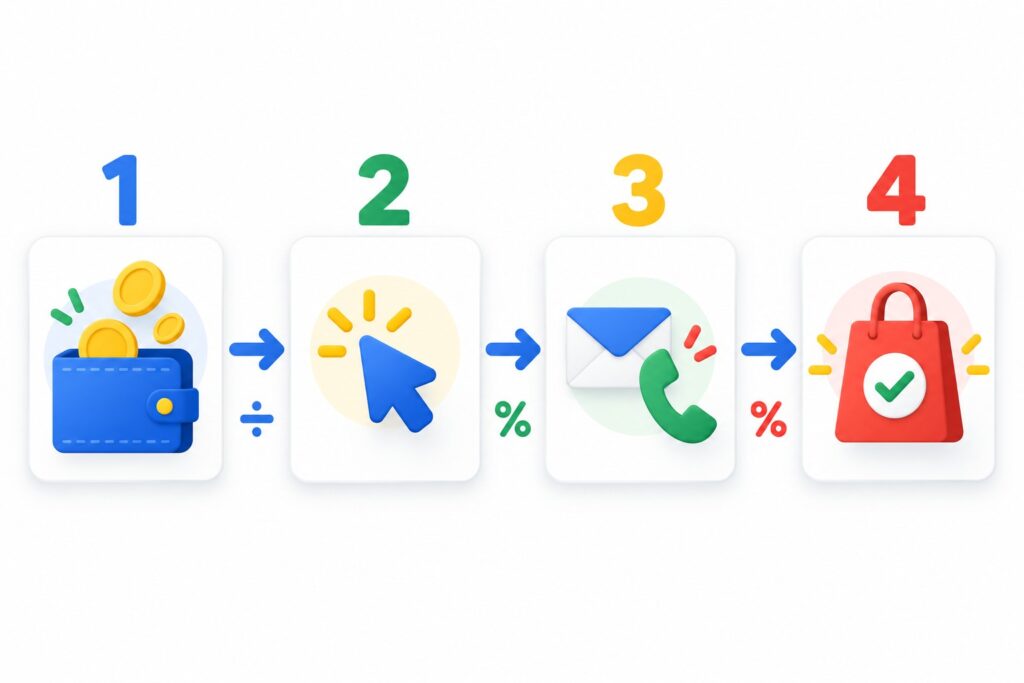
What the cost of Google Ads is made of
When business owners ask about price, they usually mean only the money that goes to Google. In practice there are more expenses. I split them into four parts.
1. Ad spend
This is what you pay Google for clicks (in Search) or for impressions and clicks (in other campaign types). Google does not set a minimum: technically you can launch a campaign with a very small daily budget. But a budget that is too small does not let the system collect data, and you simply will not see results.
2. Taxes and fees
Depending on your country, business type and payment method, taxes may be added on top of your ad spend. Check this in the billing section of your account before launch so the final amount is not a surprise.
3. Specialist or agency fees
If a specialist or an agency sets up and manages your ads, their work is paid separately. Common models are a fixed setup fee, a monthly management fee, or a percentage of ad spend. You can see what my ongoing work includes on the Google Ads management page.
4. Website and analytics
Ads bring people to your website. If the site is slow, confusing or does not accept inquiries, the budget is wasted. Sometimes the site needs work before launch. Analytics and conversion tracking belong here too: without them you will not know which clicks turned into leads.
How cost per click is formed
In Search, Google runs an auction every time someone types a query. Every advertiser who wants to show for that query takes part. The winner is decided not only by the bid but also by quality: how well the ad and the landing page match the query and how likely a click is.
Cost per click depends on:
- Competition in your niche. Legal services, healthcare, real estate, finance and B2B are usually more expensive, because one client is worth a lot and advertisers are willing to pay more.
- Location. Clicks in capitals and large cities usually cost more than in smaller towns. Clicks in the US or Western Europe are almost always more expensive than in Eastern Europe.
- Ad and landing page quality. The better your ad answers the query and the more convenient your landing page, the less you overpay for the same position.
- Bid strategy. Automated strategies raise and lower bids on their own, so your choice of strategy affects your average cost per click.
- Seasonality and time of day. During peak demand competitors raise budgets and clicks get more expensive.
As a reference point: industry reports for 2026 put the median cost per click in Google Search in the US at around 5 dollars, ranging from 1-2 dollars in arts and entertainment to almost 10 dollars in legal services. In many other markets clicks are noticeably cheaper, but the spread between niches is just as wide. You can estimate the price for your niche in advance in Google Keyword Planner: it shows an approximate top-of-page bid range.
How Google charges you: daily budget and monthly limit
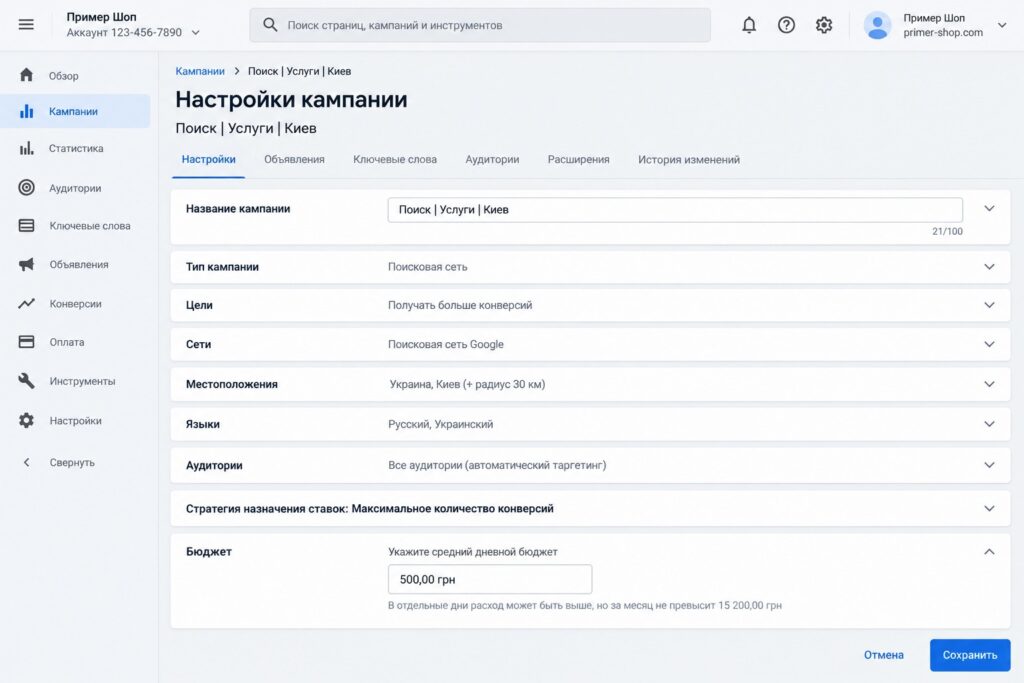
In campaign settings you set an average daily budget. Two things are important here.
- On a given day Google can spend up to twice your daily budget if it sees more potential customers. On other days it spends less.
- In a calendar month you will not be charged more than your daily budget multiplied by 30.4. If the system does overdeliver, the difference is returned as a credit to your account.
So with a daily budget of 20 dollars your monthly limit is about 608 dollars. That is the number to put into your plan, not “exactly 20 dollars a day”.
How to calculate a starting budget: a simple formula
I calculate the budget backwards, starting from how many leads the business needs. The formula looks like this:
- Decide how many leads or sales you want per month.
- Estimate your website conversion rate: the share of visitors who leave an inquiry. For a service website with a clear form and a phone number it is often a few percent, but it depends on the niche and the site.
- Calculate the number of clicks you need: leads divided by conversion rate.
- Find the approximate cost per click in Keyword Planner.
- Multiply clicks by cost per click. That is your estimated budget.
An example with made-up numbers. You want 30 leads per month and your site converts 3% of visitors. That means you need about 1,000 clicks. If a click in your niche costs about 1 dollar, the budget is roughly 1,000 dollars a month and each lead costs about 33 dollars. If a click costs 4 dollars, the same result needs about 4,000 dollars.
How much to spend in the first month
The first month is almost always a learning period. The system collects data, you find junk search terms, pause weak keywords and test ads. So my advice is:
- plan a budget that covers at least a few hundred clicks in the month, otherwise your conclusions will be random;
- do not spread money across five campaigns at once, start with one or two built on the most “ready to buy” queries;
- do not judge results by the first three to five days;
- track leads from day one so you see the cost per lead, not just the cost per click.
If your budget is very small, it is better to narrow the location and the keyword list than to show up everywhere a little.
How to lower your Google Ads cost without losing leads
There are two ways to cut costs: pay less per click, or get more leads from the same clicks. The second one usually gives more. Here is what I check first.
- Search terms. I open the search terms report and look at the actual queries that triggered the ads. Almost every account has searches that spend money and bring no leads.
- Keywords and match types. Broad match without conversion data often drifts far from your topic. At the start I prefer phrase and exact match for the most important queries.
- Locations and ad schedule. If you serve only one city, your ads should not run across the whole country. If nobody handles inquiries at night, it makes sense to reduce activity during those hours.
- Ads. The more closely your headlines match the query and the more specific the benefit, the higher your click-through rate and quality. Higher quality lowers your cost per click for the same position.
- Landing page. Fast loading on mobile, a clear offer above the fold, a short form and a call button. Sometimes one change to a form does more than a month of bid optimization.
- Budget allocation. If one campaign consistently brings cheap leads and another brings expensive ones, shift money toward the first.
Make changes gradually and compare results over comparable periods. Otherwise you cannot tell what actually worked.
Common mistakes that make Google Ads more expensive
- No conversion tracking. Without it automated strategies optimize blindly and you do not know your cost per lead.
- Broad match without negative keywords. Ads show for irrelevant searches like “free”, “DIY” or “jobs”. Review search terms regularly and add negatives.
- A weak website. If the site converts 0.5% instead of 3%, every lead costs six times more at the same cost per click.
- Comparing only cost per click. A cheap click does not mean a cheap lead. Look at cost per lead and, ideally, cost per sale.
- Constant sharp changes. If you change bids and budgets every day, automated strategies never get a chance to learn.
To make sure nothing is missed before launch, go through my Google Ads checklist.
FAQ
Is there a minimum budget in Google Ads?
There is no formal minimum. But if your budget covers only a dozen clicks a day and clicks in your niche are expensive, you will have too little data and your conclusions will be random. A sensible minimum depends on the cost per click in your niche.
Can I pay only for results?
In Search campaigns you pay for clicks. With a Target CPA strategy Google tries to keep your average cost per conversion at the level you set, but you still pay per click and there is no guaranteed cost per lead.
Why are my competitor’s ads cheaper?
Usually it comes down to quality: more relevant ads, a better website, a tighter choice of keywords and locations. Another common reason is that the competitor only looks at cost per click, not cost per lead.
Is it better to run a bigger budget on some days or a small one every day?
A steady daily budget with a narrow focus is better. Automated strategies learn poorly when a campaign keeps getting switched on and off. If money is tight, cut the number of keywords and locations, not the days your ads run.
How soon will Google Ads pay off?
The first inquiries can come in the first days. But a stable picture of your cost per lead usually appears after 3-6 weeks, once the system has learned and junk traffic has been cut.
Conclusion
Google Ads costs as much as you are willing to pay for a customer. First work out how many leads you need and what cost per lead your business can afford, then estimate cost per click and your website conversion rate. That turns your budget into a clear number instead of a lottery.
If your ads are already running and they feel too expensive, order a free Google Ads express audit: I will review your account and show you where the money leaks. If you need a deeper review, there is also a full Google Ads audit. And I share practical walkthroughs on my YouTube channel, so feel free to subscribe.