
Remarketing in Google Ads means showing ads to people who have already visited your website, watched your YouTube videos or are in your customer database. In the Google Ads interface these lists are now called “Your data segments”. Getting remarketing running takes three steps: add the Google tag to your site (or link Google Ads with GA4), create segments in Audience manager, and add them to campaigns using either “Targeting” or “Observation”.
I have been setting up and managing Google Ads for more than 9 years, and in almost every account I start with remarketing: it is the warmest audience you have, people who already know you and usually convert better than cold traffic. Below I will show which segments to create, how to set them up step by step, and where people most often go wrong.

What remarketing is and where it works
Someone visits your site, looks at a product or service and leaves. Most visitors do exactly that: few people buy on their first visit. Remarketing lets you show them your ads again when they search for something similar on Google, browse Google partner sites or watch YouTube.
Your data segments can be used in almost every campaign type:
- Search campaigns. You can raise bids or show dedicated ads to people who have already visited your site and are searching for your product again.
- Display campaigns. Classic banner remarketing across websites and apps.
- YouTube video campaigns. Show videos to past site visitors, or remarket to your channel’s viewers.
- Demand Gen campaigns. Placements on YouTube, Gmail and Google’s discovery feeds.
- Performance Max. Here segments act as audience signals: a hint to the algorithm about who to start with.
Good news from the past year: Google lowered the minimum segment size. To serve ads on the Search Network, the Display Network and YouTube, a segment now needs just 100 active users in the last 30 days. Search used to require 1,000, which kept search remarketing out of reach for many small businesses.
What to prepare before setup
- The Google tag on every page of your site. You can install it directly or through Google Tag Manager. If GA4 is already installed and linked to Google Ads, you can also build segments from GA4 data.
- A GA4 and Google Ads link with personalized advertising enabled, if you want to use audiences from Analytics.
- Cookie consent. If you have visitors from the EEA, you need a consent banner and Consent Mode, otherwise some people will not be added to your segments.
- Policy restrictions. In some areas (for example health, financial hardship and other sensitive categories), Google’s personalized advertising policies restrict or prohibit remarketing. Check the rules for your niche before you launch.
Data sources for segments
In Google Ads, your data segments can be built from several sources:
- Website visitors. The most common option: people who visited your site or specific pages.
- YouTube users. People who watched your videos, subscribed to your channel or liked your content.
- Customer lists. Uploaded emails and phone numbers of your customers (Customer Match). Your account has to meet Google’s eligibility requirements for this.
- App users, if you have an app with tracking.
- GA4 audiences, which appear in Google Ads automatically once the accounts are linked.
How to create a website visitors segment: step by step
- In Google Ads, click the “Tools” icon.
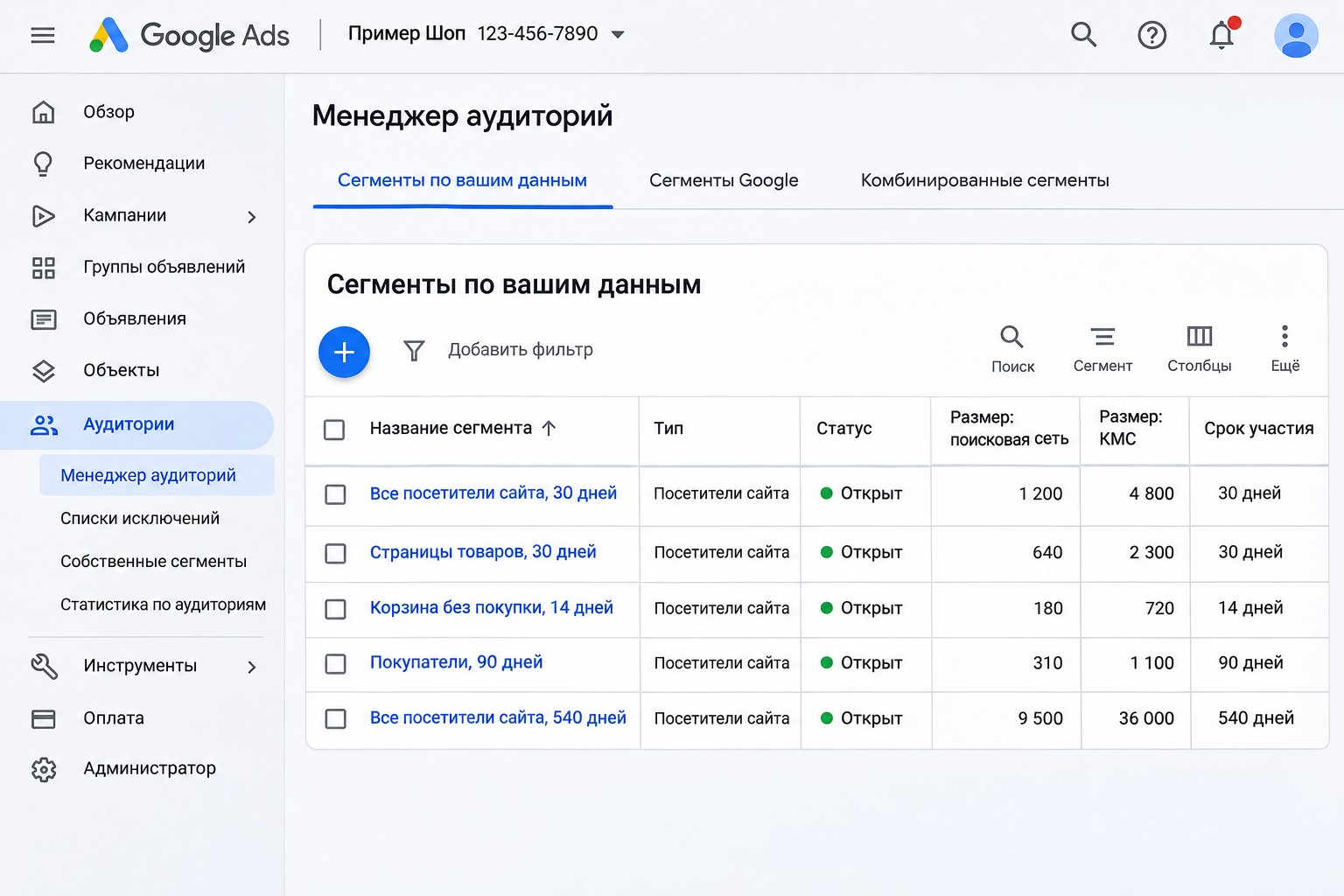
- Open “Shared library” and select “Audience manager”. The “Your data segments” page opens by default.
- Click the plus button and choose the “Website visitors” segment type.
- Give the segment a clear name that will still make sense in six months, for example “Site: service pages, 30 days”.
- Set the rule for who joins the segment. Most often it is visitors of pages whose URL contains a certain part, such as “/services/” or “/catalog/”.
- If the option is available, turn on prefilling: the segment will immediately include people who matched the rule in the last 30 days, so you do not start from zero.
- Choose the membership duration: how many days a person stays in the segment after their last visit. The maximum is 540 days, the default is 30.
- Save the segment. It usually takes from a few hours to 2-3 days to fill up.
The segments I create first
A single “all visitors, 30 days” segment is better than nothing, but the real power of remarketing comes from splitting people by level of interest. Here is the basic set I start with in almost any account:
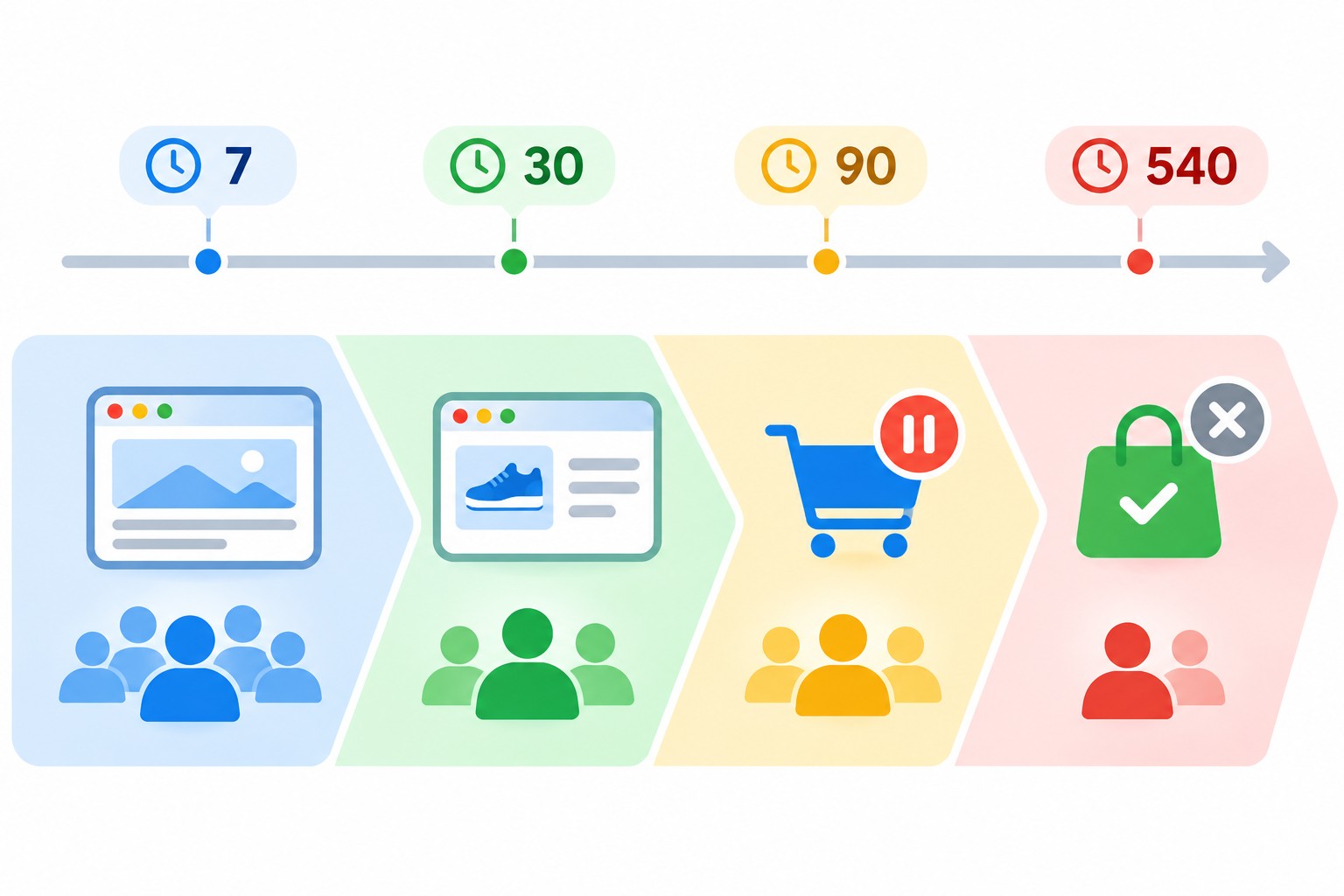
- All site visitors: 7, 30, 90 and 540 days. Different durations let you treat yesterday’s visitors differently from those who came six months ago.
- Visitors of key pages (product pages, service pages, pricing) in the last 30 days. They were interested in a specific offer.
- Started checkout or a form but did not finish. The hottest segment. It deserves its own message and often its own budget.
- Converted visitors (reached the “Thank you” page) in the last 30-90 days. This segment is mainly for exclusions, so you do not pay to show ads to people who have already bought.
- A customer list from your CRM. For repeat sales or, on the contrary, to exclude existing customers from acquisition campaigns.
- YouTube channel viewers, if you run a channel.
For more complex conditions there is the “Custom combination” type, for example “visited a product page” and “did not visit the Thank you page”.
GA4 audiences for remarketing
If GA4 is set up on your site, it is often easier to build audiences in Analytics: you get more conditions, such as events, number of sessions, engagement or purchase value. Here is the process:
- Link GA4 with Google Ads and enable personalized advertising in the link settings.
- In GA4, go to “Admin” and under “Data display” select “Audiences”.
- Create an audience with the conditions you need, for example “added to cart but did not buy”, based on GA4 events.
- Within a day or two, the audience appears in Google Ads Audience manager and can be added to campaigns.
Important: GA4 audiences start filling after you create them, and the first users appear within 24-48 hours. So create them in advance, not on the day the campaign launches.
How to add segments to campaigns
When you add an audience to a campaign or ad group, you need to choose a setting:
- “Targeting” narrows reach: ads are shown only to people in the selected segments. This is the setting for classic remarketing on Display and YouTube.
- “Observation” does not change reach, it only collects statistics for the segment. In Search campaigns I almost always add segments with Observation: you can see how returning visitors behave and make decisions based on that.
How I use segments across campaign types:
- Search. Segments with “Observation”. With manual bidding you can set a bid adjustment for visitors. With automated bidding Google takes these signals into account itself, and bid adjustments are ignored in most cases.
- Display and video. A separate remarketing campaign with “Targeting” and a frequency cap, so people do not get tired of seeing the same banner.
- Performance Max. I add segments as audience signals in the asset group. This speeds up learning but does not limit ads to only those people. More on this in my Performance Max setup guide.
- Exclusions. I exclude converted visitors and existing customers from acquisition campaigns when the goal is new sales.
I covered how to split campaigns and ad groups so remarketing does not get mixed with cold traffic in my article on Google Ads account structure.
Creatives and frequency: what to show
Remarketing works when the message acknowledges that the person has already been to your site. Repeating the same ad you show to cold audiences makes little sense. What works better:
- for people who viewed a product: a reminder of that product, reviews, answers to common objections;
- for people who abandoned a cart or form: a simple reminder and a reason to come back now (delivery terms, warranty, a limited offer if there really is one);
- for people who visited long ago: new arrivals, seasonal offers;
- for customers: related products and repeat purchases.
It is best to cap ad frequency on Display, especially for short membership durations. The right number depends on your niche and the length of the buying cycle, so start moderate and watch the reports.
Common mistakes
- One segment for everyone. Someone who abandoned their cart yesterday and someone who opened the home page six months ago get exactly the same ad.
- Not excluding buyers. Money goes on showing ads to people who have already paid.
- Creating segments on launch day. Segments and GA4 audiences do not fill instantly, so the campaign starts with nobody to reach.
- Not checking the tag. If the Google tag is missing from some pages or fires with errors, segments stay nearly empty. Tag Assistant makes this easy to check.
- Using “Targeting” on Search by mistake. If you choose Targeting instead of Observation, the search campaign will only show to returning visitors, and traffic will drop sharply.
- Ignoring cookie consent. For EEA visitors without proper consent, segments fill up more slowly.
FAQ
How many people does a segment need for remarketing to work?
Today, 100 active users in the last 30 days is enough to serve ads on the Search Network, the Display Network and YouTube. But small segments collect data slowly, so wait at least a few weeks before drawing conclusions.
How do Google Ads segments differ from GA4 audiences?
Google Ads segments are built from URL rules and Google tag events, and they are easier to create. GA4 audiences are more flexible: you can use events, parameters, session counts and purchase value. Both are used in campaigns the same way.
Can I run remarketing without a website?
Partly, yes: you can use customer lists and YouTube users. But site visitors remain the main and most useful source.
What membership duration should I set?
It depends on your buying cycle. For inexpensive products 7-30 days is usually enough. For expensive services with a long decision process, it makes sense to keep people for 90-180 days or longer. The maximum is 540 days.
Why is my segment empty or not eligible?
Most often the tag does not fire on the right pages, the URL rule has a typo, or not enough time has passed since the segment was created. A segment is also not used for serving until it has at least 100 active users.
Conclusion
Remarketing is one of the most profitable tools in Google Ads when set up carefully: the tag on every page, several segments by level of interest, buyers excluded, a dedicated message for each group, and the right “Targeting” or “Observation” setting for each campaign type. Start building your basic set of segments today so they are already filled when your campaigns go live.
If you want me to check how audiences and remarketing are set up in your account, book a free Google Ads express audit. And on my YouTube channel I walk through Google Ads and analytics setups with real-world examples.