A Google Ads Search campaign shows your ads to people who are searching for your product or service right now. To make it bring leads and not just clicks, you need to do three things: prepare conversion tracking, choose the right campaign settings, and build precise keywords with strong ads.
I have been setting up Google Ads for more than 9 years, and below is the order I use myself. The guide reflects the 2026 interface. Google renames menu items from time to time, but the logic stays the same.
What to prepare before creating a campaign
Do not rush to click “New campaign”. Half of all problems with Search ads come from skipped preparation.
- A Google Ads account. If you do not have one yet, create it and add billing details right away. When Google asks you to complete advertiser verification, do not put it off.
- Conversion tracking. Decide what counts as a lead for you: a form submission, a call, a messenger message, a purchase. Set these actions up as conversions. If you would rather not do it yourself, I can handle the analytics setup for you.
- Landing pages. Each group of services or products needs a page that answers the query precisely. An ad about fridge repair should not lead to the home page of a general appliance service.
- Keywords and negative keywords. Collect queries in Keyword Planner and prepare a basic list of negative keywords at the same time.
- Budget. Estimate how much you are ready to spend per month and divide it by 30.4: that is your average daily budget.
How many Search campaigns to create at the start
A common question is whether to build one campaign for everything or several. I decide based on the budget and how different the business lines are.
- One campaign works if you have one service, one location and a small budget. All the data is collected in one place, and the bid strategy learns faster.
- A separate campaign per business line makes sense if services have different margins or a different acceptable cost per lead. Then you can control each budget separately.
- A separate brand campaign is useful if people already search for your name. Brand clicks are cheap and convert better, so do not mix them with generic queries, or your stats will look better than they really are.
- Separate campaigns by location or language make sense only when they need different budgets or different landing pages.
At the start it is better to have fewer campaigns with enough budget each than ten campaigns getting a few clicks a day.
Step 1. Create a campaign and choose a goal
- In the left menu open “Campaigns”, click the blue plus button and then “New campaign”.
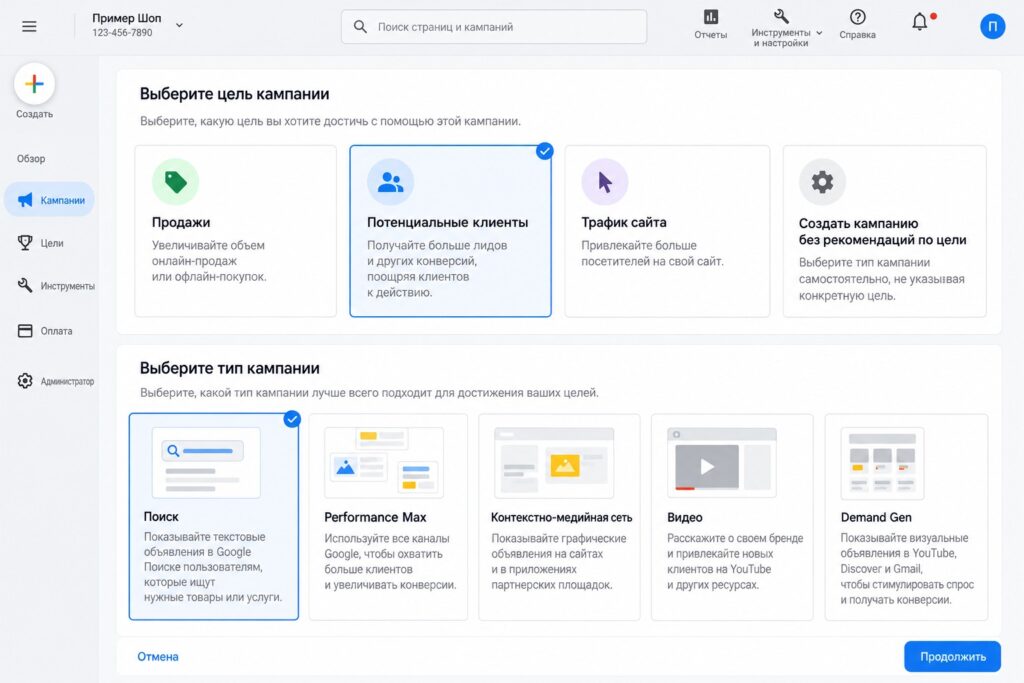
- Choose a goal. For most service businesses it is “Leads”, for an online store “Sales”. You can also create a campaign without goal guidance, but then you will need to check every setting manually.
- In the conversion goals block, keep only the actions that really mean a lead or a sale. If you see “page views” or “website visits” there, remove them from this campaign.
- Campaign type: “Search”.
- Give it a clear name, for example “Search | Fridge repair | London”. When you have ten campaigns, you will thank yourself.
Step 2. Bid strategy
Google will ask what you want to focus on: conversions, conversion value, clicks or impression share.
- A new account with no conversion history. I usually start with “Maximize clicks” with a maximum CPC limit, or with “Maximize conversions” without a target CPA if conversions are already set up and the budget allows.
- There is conversion history. Switch to “Maximize conversions” and, once enough data builds up, set a target CPA.
- An online store that passes conversion value. A value-based strategy and, over time, target ROAS.
Step 3. Campaign settings: networks, locations, languages
Networks
By default Google includes both Search partners and the Display Network. For a Search campaign I recommend unchecking the Display Network: ads on websites and apps are better run as a separate campaign. You can keep Search partners at the start, but check their results in the network report after a couple of weeks.
Locations
Add the cities or regions where you actually operate. Then open location options and target people who are in, or regularly in, your selected locations. The “interest in your locations” option often brings extra clicks from elsewhere.
Languages
Choose the languages your customers speak. Google determines language from user settings and behavior, not from the language of your ad, so in multilingual markets it is worth selecting all relevant languages.
Audiences
At the start you can add audiences in observation mode. They do not narrow your reach, but they show which segments convert better.
Step 4. AI Max and broad match
In new Search campaigns Google offers AI Max turned on by default. It is a set of features: search term matching beyond your keywords, automatically generated ad text, and final URL expansion, where Google picks the landing page on your site.
My approach is simple. If the budget is small and conversions have only just started coming in, I launch the campaign without AI Max and with controlled keywords. Once the campaign brings leads consistently, AI Max is worth testing, always with URL and brand exclusions, and comparing the results. Turning on every automated feature in a new account with no data means handing your budget over to the system’s experiments.
Step 5. Ad groups and keywords
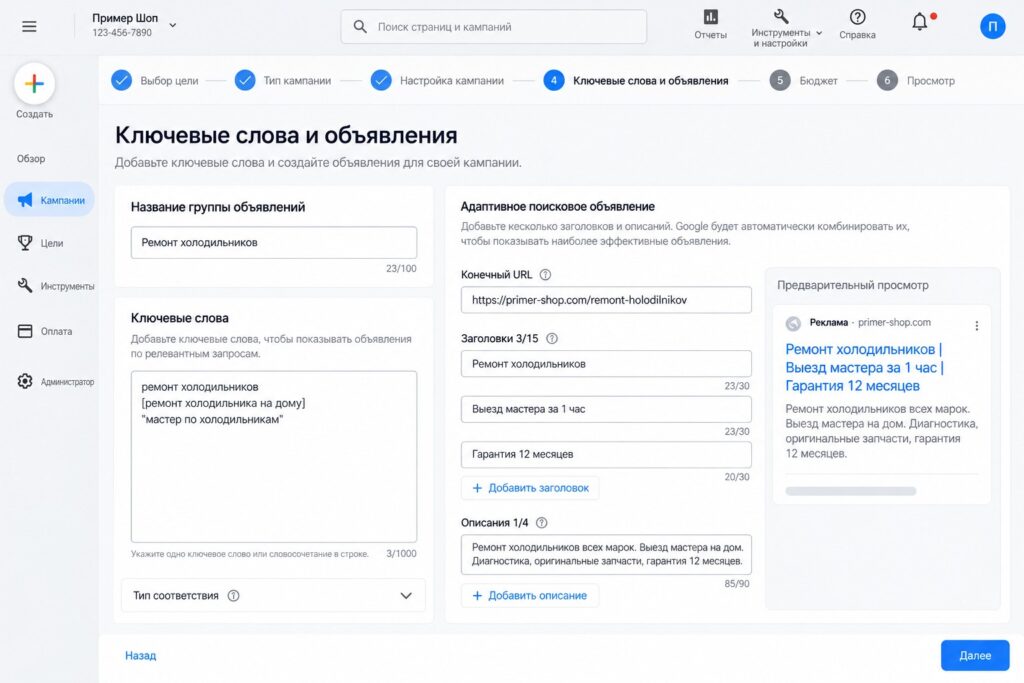
One ad group = one service or one narrow topic. Do not mix “fridge repair” and “washing machine repair” in one group: they need different ads and different pages.
- Name the ad group.
- Add 5-20 keywords that are close in meaning.
- Choose match types. Phrase match goes in quotation marks, exact match in square brackets, and no symbols means broad match.
- Add negative keywords at the campaign level right away: “free”, “DIY”, “jobs”, “course” and others that are irrelevant to your business.
Step 6. Responsive search ads
Search now uses responsive search ads. You can add up to 15 headlines of up to 30 characters and up to 4 descriptions of up to 90 characters. Google combines them to match each query.
What I recommend writing:
- 1-2 headlines with the main keyword;
- headlines with benefits: timing, warranty, call-outs, delivery;
- a headline with a call to action: “Request a quote”, “Get a price estimate”;
- descriptions that handle objections and clarify terms.
Pin headlines only where you really need to, for example for legal requirements: pinning reduces the number of combinations.
Also add assets: sitelinks, callouts, a phone number, structured snippets. They make your ad bigger and improve click-through rate.
Step 7. Budget, review and launch
- Set an average daily budget. Remember that on a given day Google can spend up to twice that amount, but in a month it will not exceed “daily budget x 30.4”. In 2026 Search campaigns also got campaign total budgets for a set period, which is handy for promotions with fixed dates.
- On the review page Google will show issues that may limit your ads. Fix them.
- Click “Publish campaign”. Your ads will go through review, which usually takes from a few hours to one business day.
What to check in the first week after launch
- Search terms report. Look at it every 2-3 days and add junk queries as negatives.
- Ad and keyword statuses. Make sure there are no disapproved ads or keywords with low search volume.
- Conversions. Submit a test lead and make sure it was recorded.
- Spend. Check that one ad group or one keyword is not eating the whole budget.
Do not make big changes more often than once every few days: bid strategies need time to learn. Before launch it is convenient to go through my Google Ads checklist.
Common mistakes when setting up a Search campaign
- The Display Network is left on, and half of the budget goes to impressions on websites.
- Location targeting includes people “interested in” a region rather than people in it.
- All keywords sit in one ad group with one generic ad.
- No negative keywords, so ads show for job searches and free alternatives.
- Micro-actions are counted in conversion goals, and the automated strategy optimizes for them.
- Ads lead to the home page instead of a page for the specific service.
FAQ
How long does it take to set up a Search campaign?
A simple campaign for one service can be built in a few hours. A campaign with several business lines, well-researched keywords, negatives and ads usually takes me 2-5 business days, including an analytics check.
Which bid strategy should a new account use?
If conversions are set up and the budget covers at least a few dozen clicks a day, you can start with “Maximize conversions”. If there is no data at all, it is easier to start with clicks and a CPC limit and switch to conversions later.
Should I turn on AI Max right away?
Not necessarily. In a new account with no conversion history I prefer to start with a controlled setup and test AI Max later, when there is something to compare it with.
How many keywords should an ad group have?
Usually 5-20 close in meaning. What matters more than the number is that every keyword in the group fits one ad and one landing page.
Conclusion
A good Search campaign starts not in the Google Ads interface but with preparation: conversions, landing pages and a list of queries. Then it is important to switch off unnecessary networks, set the location precisely, split keywords into tight groups and write ads that answer the query. After launch, clean up search terms regularly and the campaign will only get more efficient.
If you would rather not do it yourself, I can set up Google Ads for you, or take over ongoing Google Ads management. If your campaign is already running but the results are not what you want, order a free express audit. You will find more practical walkthroughs on my YouTube channel.