
If your Google Ads account has been suspended, don’t rush to open a new one: that almost always makes things worse. First find out exactly which policy was violated, fix the cause, and submit one careful appeal. Below I walk through the most common reasons Google suspends accounts, how to read the suspension notice, and how to get your ads running again step by step.
What “account suspended” actually means
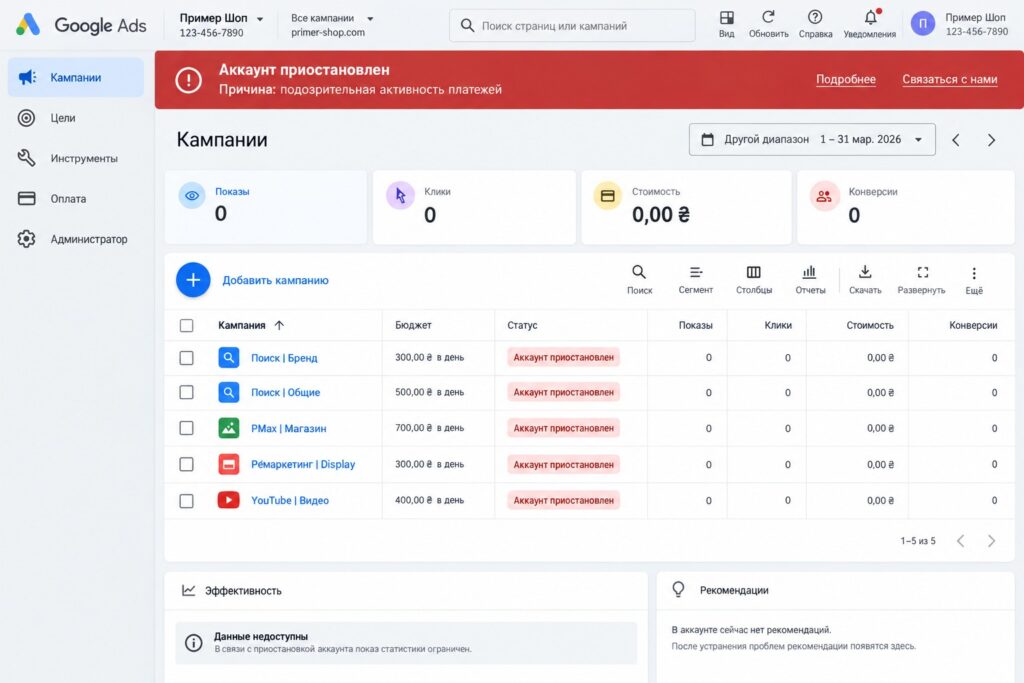
A suspension is not the same as a disapproved ad. A disapproval affects one ad or asset. A suspension stops the whole account: no campaign can serve.
Key points to know:
- Google treats a suspension as permanent unless an appeal is approved. It won’t “expire in a week”.
- The account stays available in read-only mode. You can view reports, pay a balance, change the payment method, download documents, submit an appeal, and, if needed, cancel the account to get a refund of any remaining funds.
- Related accounts (same owner, payment method, website or documents) may be suspended too.
- New accounts created after a suspension are usually suspended as well. Google’s help center explicitly recommends reinstating the existing account first.
The main reasons for suspension
I group the reasons into three buckets: payments, circumventing the rules, and advertiser verification.
Suspicious payment activity
This is one of the most common reasons for small businesses. The system sees something in the payments that looks like fraud: the card was issued in another country, the cardholder doesn’t match the business owner, there was a chargeback, the payment method was changed many times, or the card was previously used in a suspended account.
A separate case is an unpaid balance. If you are on monthly invoicing or automatic payments and a charge is overdue, the account is suspended until it’s paid. You usually don’t need an appeal here: once the payment clears, the account works again.
Circumventing systems
This is one of the most serious violations. Google considers it egregious and can suspend the account immediately, with no warning. It covers:
- cloaking, where the reviewer and the user see different pages;
- trying to trick ad review: character substitutions, tricky redirects, changing page content after approval;
- running the same violating ads from another account;
- opening a new account after the old one was suspended.
Sometimes honest advertisers get caught too. For example, the site serves different content to different countries, or the account still has ads that were disapproved earlier and were rewritten to “work around” the policy instead of fixing the actual issue.
Unacceptable business practices
Google suspends accounts it believes are misleading users: hiding who the business is, promising things that don’t exist, or collecting data under false pretenses. In practice this is often triggered by the website itself: no company details or contact information, no shipping and return terms, prices that don’t match the ads, or aggressive claims like “guaranteed results in 3 days”.
Failed advertiser verification
Google asks you to verify your identity or organization. There is a limited time to respond (usually about 30 days per stage). Miss the deadline and your ads stop serving. If the information turns out to be false, a full suspension can follow.
Repeat violations and the strike system
For some policies Google uses a strike system. The first violation gets only a warning. The first and second strikes lead to temporary account holds of 3 and 7 days, and the third strike suspends the account. That’s why disapproved ads shouldn’t be ignored: they add up.
How to find out why you were suspended
- Open the account. There will be a red suspension notice at the top. Click “Details” and read the policy name.
- Check the inbox of the account’s primary contact. Google sends an email with the violation name and an appeal link.
- Open the Policy manager under “Tools”. It shows disapproved ads and assets and the history of violations.
- Write down the exact policy name. Everything you fix depends on it. “Suspicious payment activity” and “Circumventing systems” are resolved in completely different ways.
If the notice is unclear, don’t guess. It’s better to ask Google Ads support a question than to send an appeal blindly.
Suspension or just stopped ads: how to tell
Not every pause in delivery is a suspension. Before writing an appeal, make sure this is really an account suspension:
- Ad disapproved. Individual ads show “Disapproved”, the rest of the account runs. Fixing the ad is enough.
- Limited serving. “Eligible (limited)”: ads run, but not everywhere. This is about settings and topic-specific policies.
- Advertiser verification pending. A notice at the top asks you to complete verification by a deadline. Ads stop if the deadline passes, but completing verification fixes it.
- Payment issue. The card was declined or the prepaid balance ran out. Top up or replace the payment method.
- Account suspended. A red “Account suspended” notice with a policy name. Only in this case do you need the full appeal process.
How to restore the account, step by step
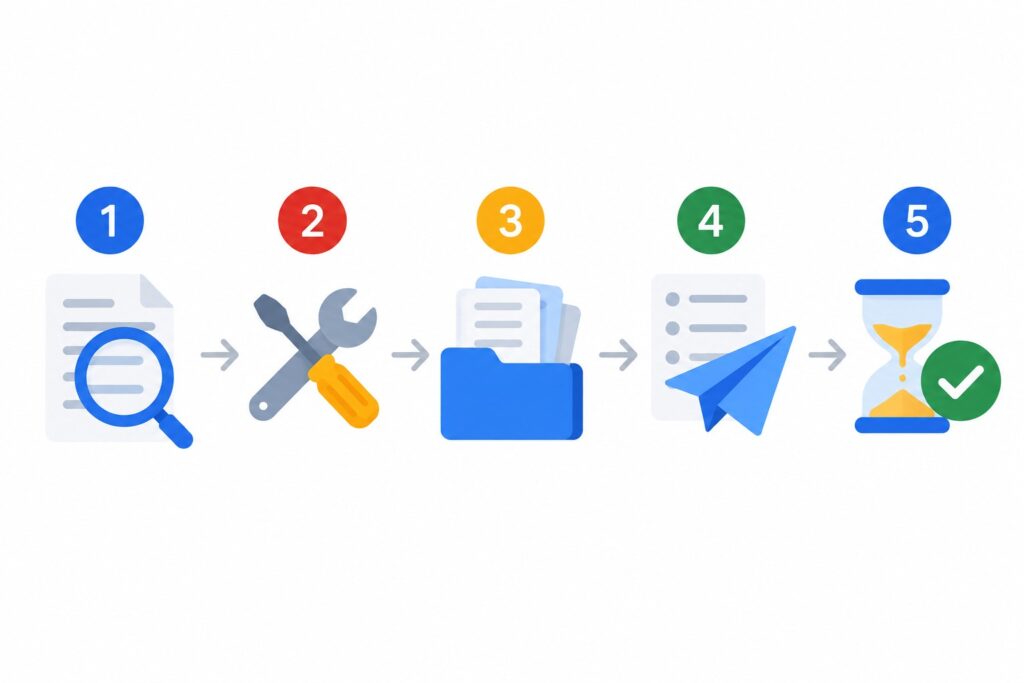
Step 1. Fix the cause
An appeal without fixes is almost always rejected. So start with the homework:
- If it’s about payments: pay off any balance, remove questionable cards, add a payment method in the name of the business owner or company, and make sure the payments profile matches your documents.
- If it’s about ads: go through every ad, including paused ones. Fix or remove anything that violates policy. Simply re-saving an ad without changes does not send it for review.
- If it’s about the website: add company details, contacts, payment, shipping and return terms, and a privacy policy. Remove claims you can’t back up. Make sure redirects lead to the same page the reviewer sees.
- If it’s about advertiser verification: prepare documents where the name and address match the payments profile.
Step 2. Gather evidence
Prepare what proves the business is real and the payments are legitimate: registration documents, a bank statement or screenshot showing the payment, a photo of the card with all digits hidden except the last four if Google asks for it, a lease or office photos for a local business. Don’t send unnecessary files, but don’t make Google guess either.
Step 3. Submit the appeal
- In the account, click the “Contact us” link in the suspension notice at the top of the screen; the appeal form opens on the right. You can also use the link in the email.
- If Google asks you to complete advertiser verification first, do it, otherwise the form won’t open.
- Keep the text short and specific: account ID, policy name, what was wrong, what exactly you changed, and which documents you’re attaching.
- Tell the truth. If you made a mistake, say so and explain how it’s been fixed.
A sample appeal structure
Here’s the template I use as a starting point. Adapt it to your situation rather than sending it as is:
- Who you are. “Company X, website Y, account ID 123-456-7890. We sell (provide) Z in region W.”
- What happened. “The account was suspended under the suspicious payment activity policy.”
- What you found. “A card not issued to the company was linked to the account. We removed it.”
- What you fixed. “We added a payment method in the company’s name, updated the payments profile, and reviewed the website: added company details and return terms.”
- What you’re attaching. “Company registration documents and bank confirmation of the payment.”
The more specific and concise, the better. Long emotional letters about how important ads are for your business don’t affect the decision.
Step 4. Wait and don’t duplicate
One appeal at a time. Sending another before you hear back on the first won’t speed up the review. Google has no fixed timeline: it can take a few days or a few weeks. If the appeal is rejected, resubmit only with new facts or new fixes.
Step 5. After reinstatement
Ads may go through review again, so delivery doesn’t always resume immediately. Check campaign and ad statuses, the payment method, and conversion tracking. If there are still no impressions, read my article on why Google Ads shows no impressions.
Common mistakes
- Opening a new account instead of appealing. Google links accounts through cards, websites, devices and documents. A new account is often suspended for circumventing systems, and then the odds of restoring the old one drop.
- Appealing without fixing anything. You’ll get the same answer, and a history of rejections doesn’t help.
- Paying with someone else’s card. A friend’s or relative’s card, or a foreign card unrelated to the business, looks risky to the system.
- Sending five appeals in a row. It doesn’t speed things up, it only creates confusion.
- Paying shady services for an “unban”. Nobody can guarantee the outcome: only Google decides. Promises of “100% reinstatement” should be a red flag.
- Giving account access to anyone. Logins from suspicious devices and countries can also be a signal. Grant access only to specific people’s emails, at the lowest level they need.
How to lower the risk of suspension in the future
- Pay with a card or account issued to the same business that’s listed in the payments profile.
- Complete advertiser verification as soon as Google asks, don’t wait until the last day.
- Keep full contacts, company details and terms on your website.
- Don’t ignore disapproved ads: fix them right away so strikes don’t pile up.
- Don’t use redirects or page swaps, not even “for testing”.
- Once a month, open the Policy manager and check for new issues. A Google Ads checklist is handy for regular self-checks.
FAQ
How long does an appeal take?
Google doesn’t give a fixed timeline. In practice, a response comes in anywhere from a few days to a few weeks, depending on the reason and the review team’s workload.
Can I get money back from a suspended account?
If you have unused prepaid funds and qualify for a refund, you can get it by canceling the account. But if you plan to restore the account, don’t cancel it.
What if my appeal is rejected?
Reread the policy carefully and check the account and website again. The problem is often a small thing that was missed: an old ad, a page on the site, a second card in the profile. Resubmit only when you have new fixes or documents.
I was suspended for circumventing systems, but I didn’t circumvent anything. What now?
Check for related suspended accounts (same website, card or email), redirects, and different content for different countries. If you find nothing, explain in the appeal how the site works and where its traffic comes from, and attach your business documents.
Should I just open a new account right away?
No. While your main account is suspended, a new one is very likely to be suspended too. Appeal first.
Conclusion
A suspended Google Ads account is unpleasant, but in most cases it can be fixed if you stay calm: identify the exact policy, fix the cause, gather evidence, and submit one honest appeal. The two most common mistakes are opening a new account and appealing without fixing anything.
If you’d rather not deal with it yourself, or the account needs a cleanup after reinstatement, order a Google Ads audit. If the account is running but you’re not sure everything is in order, start with a free express audit. I also post Google Ads setup walkthroughs on my YouTube channel.