
A good Google Ads account structure is simple: campaigns are split by goals and budgets, ad groups by themes and landing pages, and each ad group holds keywords that answer the same customer question. If two parts of your advertising need different budgets, goals or locations, they belong in different campaigns. If they need different landing pages or different ad copy, they belong in different ad groups. Everything else is better combined. Below I show how I build the structure for a new account and how I rebuild running accounts where campaigns have multiplied without any logic.
What a Google Ads account is made of
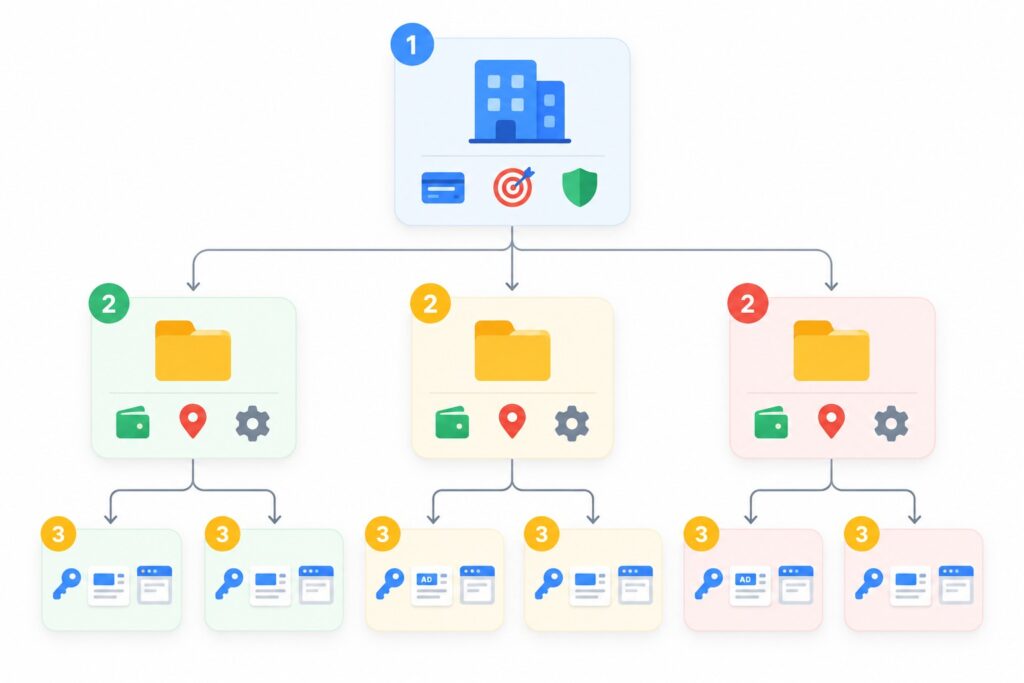
Think of a Google Ads account as a cabinet with drawers. It has three levels, and each level has its own settings.
- Account. Billing, access, conversions, shared negative keyword lists and audiences live here. One business usually runs in one account.
- Campaign. Budget, bid strategy, campaign type (Search, Performance Max, Demand Gen, Video and others), locations, languages, ad schedule and networks.
- Ad group. Keywords, ads and the landing page. An ad group answers one specific search theme.
The main rule that prevents half of all mistakes: set things up at the level where they live. Want a separate budget for New York and for the rest of the country? That is two campaigns, because location and budget are campaign settings. Want a separate ad for “fridge repair” and for “washing machine repair”? That is two ad groups, because ads and keywords live in the ad group.
How to split an account into campaigns
You need a separate campaign when something has to be managed separately: money, goal or territory. I ask myself five questions.
1. Is the budget different?
If you want to spend a fixed amount on one product line and as much as is profitable on another, they cannot share a campaign. The budget inside a campaign is shared, and Google decides where to spend it. Usually it spends on whatever gets clicks cheapest, not on what matters most to you.
2. Is the goal or bid strategy different?
A lead campaign with a target CPA and a sales campaign with a target ROAS behave differently. If product lines have very different order values or margins, I put them into separate campaigns so each one gets its own target.
3. Are locations and languages different?
If you operate in several cities or countries and prices, competition or delivery terms differ, separate campaigns by location make sense. If there is no real difference, one campaign targeting several locations is enough.
4. Keep brand searches separate
I always move searches containing your company name into their own Search campaign. They bring cheap, high-quality conversions, and when they are mixed with generic searches, overall numbers look better than they really are. That makes it easy to miss that your non-brand advertising is losing money.
5. Is the campaign type different?
Search, Performance Max, Demand Gen and Video are always separate campaigns, the platform requires it. The real question is whether you need each type. For a small business I usually start with Search and add Performance Max once there are steady conversions and a clear goal.
How to split a campaign into ad groups
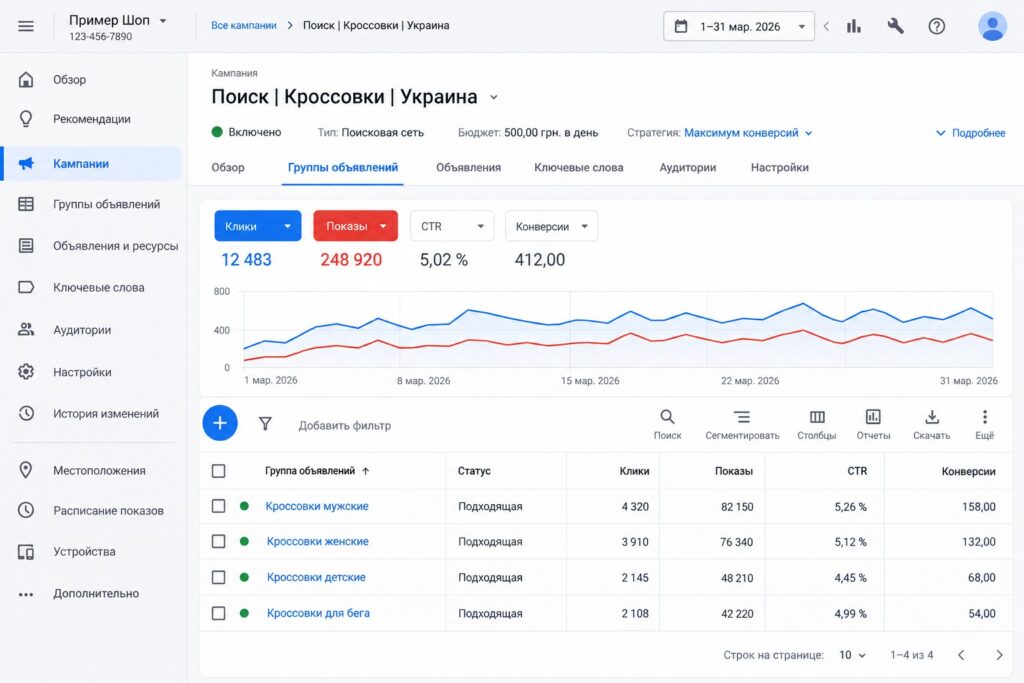
An ad group should answer one customer question with one ad and one landing page. If the searches inside a group are so different that you want to write different headlines for them, it is time to split the group.
Example for a hypothetical shoe store:
- ad group “Men’s sneakers”: men’s sneakers, buy men’s sneakers, men’s running sneakers;
- ad group “Women’s sneakers”: women’s sneakers, buy women’s sneakers;
- ad group “Winter boots”: winter boots, warm boots, boots for winter.
Each group has its own category page and its own ad with the search theme right in the headline. That improves Quality Score and click-through rate, so each click costs less. I covered why poor structure drives up click prices in my article on how to lower CPC in Google Ads.
How many keywords per ad group
There is no hard number. In small accounts I usually keep 5 to 20 keywords per ad group. What matters is not the count but that they are all about the same thing. Three on-topic keywords in a group is fine. Eighty keywords about different products is a problem, even if they bring impressions.
Do you need single keyword ad groups?
SKAGs (single keyword ad groups) used to be popular: one group, one keyword. Today Google itself recommends merging them into themed ad groups, because exact match has long included close variants and Smart Bidding learns better with more data. I moved away from SKAGs too: an account with hundreds of micro groups is hard to manage and no longer performs better.
Step by step: how I structure a new account
- List the business lines. Which products or services make money, what the average order value and margin are for each, and which locations you serve.
- Decide what needs its own budget or goal. Each of those becomes a separate campaign. Brand goes separately.
- Build the keyword list. I research searches in Keyword Planner and group them by meaning.
- Match ad groups to landing pages. Each group gets its own URL. If there is no suitable page, that is a signal to either create one or merge the group with a neighbor.
- Write ads for each group. One, at most two responsive search ads per group, with headlines that include the group theme.
- Add negative keywords. Account-wide negatives go into a shared list, campaign-specific ones stay in the campaign.
- Name everything consistently. For example “Search | Sneakers | US” for a campaign and “Men’s sneakers” for an ad group. You will thank yourself in six months.
- Check conversion tracking. Without proper conversions no structure will show you what works and what does not.
For a full walkthrough of building a Search campaign, see my guide on how to set up a Google Ads Search campaign.
Signs your structure is already broken
Accounts I audit tend to show the same symptoms.
- Dozens of campaigns with a few clicks a day each. Too little data, Smart Bidding cannot learn.
- The same keywords in several campaigns. Your campaigns compete with each other, and you cannot tell which one actually gets the traffic.
- Campaigns split by device. People used to do this to control mobile bids. Smart Bidding now accounts for device on its own, so this split only fragments your data.
- One ad group for the whole campaign, with a hundred different searches and one generic ad.
- Every ad points to the home page.
- Names like “Campaign 1” or “New campaign copy 3”.
If you recognize your account in at least two of these, the structure is worth rebuilding.
How to restructure a running account
Breaking working campaigns abruptly is risky: Smart Bidding loses its history and has to learn again. I do it in stages.
- Identify the campaigns that bring most of the conversions and leave them alone for now.
- Merge small campaigns with the same goal and budget into one. Launch the new campaign in parallel and pause the old ones once the new one has its first conversions.
- Remove duplicate keywords across campaigns.
- Split overloaded ad groups by theme and give each its own landing page.
- Wait 2-4 weeks after the changes before judging results. Quick conclusions in the first week are almost always wrong.
Common mistakes
- A structure from a 2015 textbook. Thousands of single keyword groups and separate campaigns for each match type. Today this only gets in the way of automation.
- The opposite extreme: everything in one campaign. Brand, different products, different locations and one budget. You cannot control anything.
- Splitting without a reason. A new campaign created just because the report is easier to read. Use labels and segments for reporting; extra campaigns fragment data.
- No link between ad group, ad and page. If the search is about winter boots but the ad and page are about all footwear, the customer leaves.
- Forgotten shared settings. The same negatives copied by hand into 30 campaigns instead of one shared list.
FAQ
How many campaigns should an account have?
As many as you have different budgets, goals and locations, and no more. For a small business that is often 2-5 campaigns: brand, 1-3 main product lines and, once there is data, Performance Max. Google’s account limit is much higher (10,000 campaigns), but you should never get close to it.
How many ads do I need per ad group?
Google allows up to three enabled responsive search ads per ad group. I usually create one well-filled ad (with as many headlines and descriptions as possible) and sometimes a second one to test.
Should match types be split into separate ad groups or campaigns?
Not anymore. Google recommends keeping keywords of one theme together, and when a search is identical to an exact match keyword, the system prioritizes that keyword on its own. Splitting only makes sense in special cases, for example when you want a separate test budget for broad match.
How does structure affect cost per click?
Directly, through Quality Score. When the search, the ad and the page match in meaning, expected CTR and relevance go up and you pay less for the same position. The exact difference depends on your industry.
What about Performance Max next to Search?
Performance Max can pick up part of your search traffic. If a search is identical to an exact match keyword in a Search campaign, Search takes priority. So I keep important searches in Search and let Performance Max work on additional reach.
Conclusion
A Google Ads account structure should follow the business, not the interface: campaigns for different budgets, goals and locations, ad groups for different themes and landing pages. Less fragmentation, more meaning in every group, clear names and brand kept separate. This kind of structure is easier to manage, helps automated bidding learn faster and leads to cheaper clicks.
If you are not sure your account structure is working for you, request a free Google Ads express audit: I will review the account and point out what to fix first. I also post walkthroughs of real settings on my YouTube channel, feel free to subscribe.