Clicks in Google Ads get expensive for two groups of reasons: strong competition in your niche and low quality of your own advertising. You have little control over the first and a lot of control over the second. What lowers your cost per click is precise keywords, relevant ads, a good landing page, regular search term cleanup, and the right bid strategy. Raising your bid or simply putting up with it is not the answer.
I have been managing Google Ads for more than 9 years, and I regularly see accounts where clicks cost 2-3 times more than they should. Below I explain what drives the price of a click and what I do to bring it down. All numbers here are illustrative: CPC depends heavily on niche, location, and season.
How Google sets the price of a click
Many people think you pay whatever you set as your bid. That’s not how it works. Ads are sold in an auction that runs every time someone searches.
Google calculates Ad Rank, which takes into account:
- your bid;
- ad quality at auction time: expected clickthrough rate, ad relevance, and landing page experience;
- Ad Rank thresholds, below which the ad doesn’t show at all;
- the competitiveness of that auction;
- the context of the search: device, location, time, and the search term itself;
- the expected impact of your assets (sitelinks, callouts, phone number, and so on).
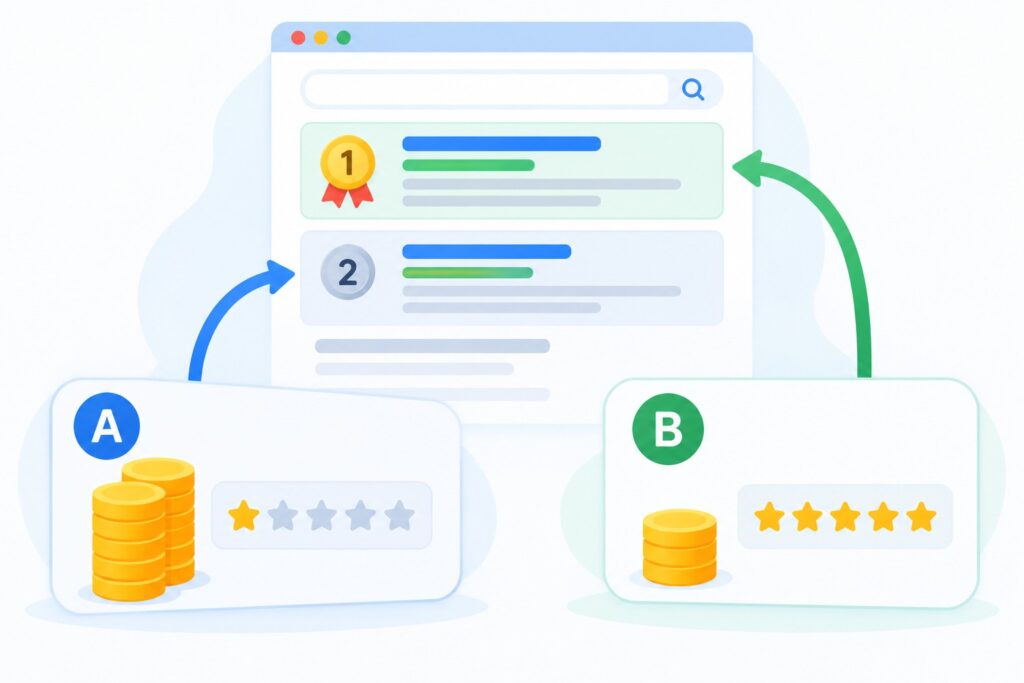
Your actual CPC is usually lower than your maximum bid. You pay only what’s needed to clear the Ad Rank thresholds and beat the advertiser directly below you. The key takeaway: if your ad is better, you can rank above a competitor and still pay less than they do.
Why your clicks are expensive: the main reasons
1. A competitive niche
Legal services, healthcare, real estate, finance, appliance repair, and B2B services are almost always expensive. A customer is worth a lot, so advertisers are willing to pay a lot. You won’t get clicks down to the level of cheap niches here, but you can pay less than your competitors.
2. Generic, high-intent keywords
Searches like “lawyer”, “home renovation”, or “buy iPhone” attract the most competition. More specific phrases (“family lawyer downtown”, “bathroom remodel turnkey”) are often cheaper and closer to a lead.
3. Low Quality Score
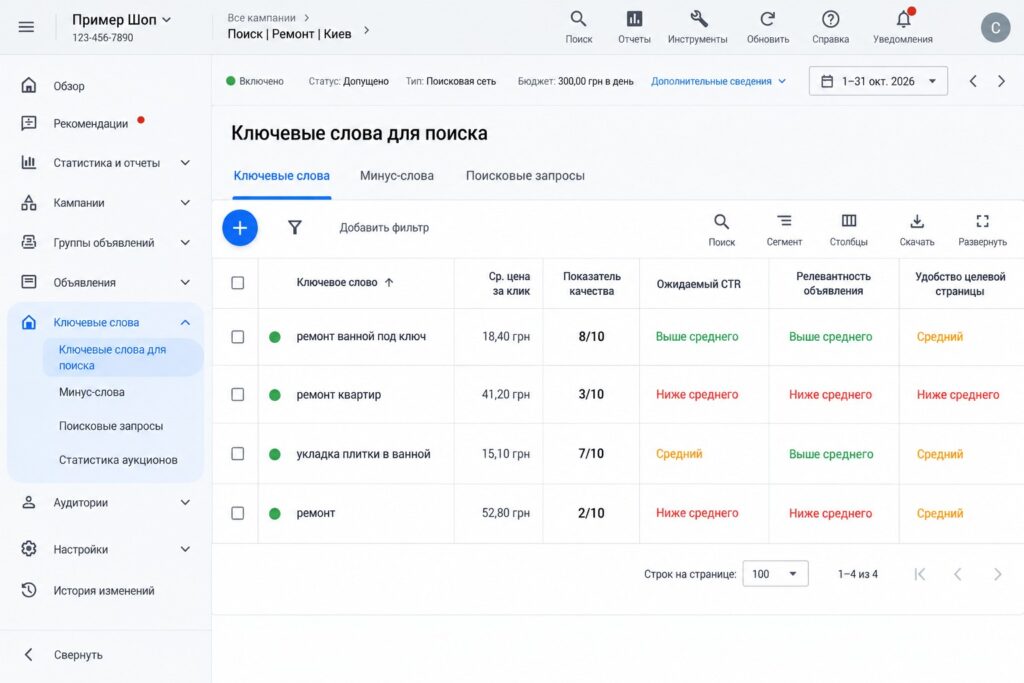
Quality Score is rated from 1 to 10 and is based on three components: expected CTR, ad relevance, and landing page experience. Each is rated Above average, Average, or Below average. If you see Below average everywhere, you are almost certainly overpaying for every click.
4. Bid strategy and targets
Automated bid strategies can bid above your usual limit when they expect a click to convert. That’s fine if conversions are set up correctly. But if junk ends up counted as conversions (page views, button clicks with no real lead), the system optimizes in the wrong direction and buys useless traffic at a high price.
Target impression share set to “absolute top of page” at 90-100% also tends to inflate CPC: you’re asking Google to always put you first, and it charges for that.
5. Broad traffic with no negative keywords
If your keywords are on broad match and you have no negatives, you pay for searches that have nothing to do with your business. On paper your CPC may look average, but the real cost of a useful click is much higher.
6. Season, time of day, and devices
During peak seasons (holidays, sales events, back-to-school for education niches) competition grows, and CPC follows. Click prices can also differ noticeably by hour, location, and device.
How to lower your cost per click: step by step
This is the order I use myself. Start with the first items: they have the biggest impact.
- Check your conversions. Keep only real leads, calls, and purchases as primary conversions. Without this, any automated strategy is optimizing blind.
- Clean up search terms. Open the search terms report for the last 30 days, sort by cost, and add irrelevant phrases as negative keywords.
- Split ad groups by theme. One ad group should cover one service or a narrow topic, not 50 different keywords. Then the ad matches the search and relevance improves.
- Rewrite ads around the search. Put the keyword in one or two headlines, add a concrete benefit and a call to action. Use all available assets: sitelinks, callouts, phone number. They raise expected CTR.
- Improve the landing page. The page should answer the exact search the visitor came from, load fast on mobile, and have a clear form or call button. Sending everyone to the homepage is almost always expensive.
- Review match types. If broad match without conversion data brings lots of junk, temporarily switch to phrase and exact match.
- Limit ads where there are no sales. Exclude regions you don’t serve, night hours if nobody handles leads, and check whether some devices perform clearly worse.
- Check the bid strategy. If you use Maximize clicks, set a reasonable maximum CPC limit. If you use Target CPA, base the target on the last 30 days of data, not on the number you’d like to see.
- Change one thing at a time and wait. Compare comparable periods of at least 1-2 weeks, otherwise you won’t know what actually worked.
If you’re building a new campaign, it’s much easier to avoid these problems from day one. My guide on how to set up a Google Ads search campaign from scratch walks through the structure step by step.
How to find CPC and Quality Score in your account
Before lowering anything, find out where exactly clicks are expensive. The account-wide average won’t tell you much: overspending is usually concentrated in a few ad groups or keywords.
- Go to Campaigns, then Audiences, keywords, and content, then Search keywords.
- Select a date range of at least 30 days.
- Click the columns icon and, under Quality Score, add Quality Score, Exp. CTR, Ad relevance, and Landing page exp.
- Sort the table by cost. The keywords eating most of your budget will be at the top.
- For each expensive keyword, look at the average CPC, the quality components, and the cost per conversion. If the cost per conversion is fine, the keyword can stay even with a high CPC. If there are no conversions or they’re very expensive, those are your first candidates for improvement.
Also open Auction insights at the campaign level. It shows who you overlap with in the auction, how often a competitor appears above you, and how those shares have changed. If overlap with a new advertiser suddenly jumped, you know where the CPC increase came from.
Brand searches
Another common source of overspending is mixing brand searches with generic ones in the same campaign. Searches with your company name are usually cheap and convert well, while generic ones are expensive. Combined in one campaign, the average CPC becomes meaningless and the bid strategy allocates budget poorly. I move brand terms into a separate campaign, so you can see the real cost of acquiring a new customer from non-brand search.
What matters more: a cheap click or a cheap lead
The goal of advertising isn’t the cheapest click. The goal is a lead or a sale at an acceptable price.
An example with illustrative numbers. Campaign A: $1 per click, 1% site conversion rate, so a lead costs $100. Campaign B: $2.50 per click, 5% conversion rate, so a lead costs $50. The campaign with the more expensive click is twice as profitable.
So when you lower CPC, always watch your cost per conversion. If your “cheaper” clicks now come from poor placements or weak searches, you saved on clicks but overpaid for results.
Common mistakes
- Cutting bids sharply across all campaigns at once. The ad loses position, and impressions and leads drop.
- Comparing your CPC to a “market average” from articles. Averages say almost nothing about your niche and location.
- Using the same ads for every ad group.
- Sending traffic to the homepage instead of a specific service page.
- Counting everything as a primary conversion, from page views to menu clicks.
- Demanding 100% of impressions at the top of the page.
- Changing strategy and budgets every day without letting the system finish learning.
Frequently asked questions
What is a normal cost per click?
There’s no universal norm. In one niche it’s normal to pay $0.30, in another $10 or more. A normal CPC is one where your cost per lead and return on ad spend work for your business. For more benchmarks, see my article how much Google Ads costs.
Why do I pay more than a competitor who ranks higher?
Most likely the competitor has a better ad and landing page. Ad Rank isn’t just about the bid, so higher-quality ads can rank higher and cost less.
Will lowering my max bid help?
Sometimes, but it’s the bluntest tool there is. Along with CPC, impressions and position usually drop. Work on quality first: search terms, ad groups, ads, landing page. Lower bids gradually and keep an eye on conversions.
Why did my CPC go up even though I changed nothing?
Possible reasons: new competitors entered the auction, a seasonal peak began, demand shifted, or your bid strategy recalibrated after a conversion change. Check Auction insights in the campaign to see who competes with you and how their share has changed.
Conclusion
Your Google Ads CPC depends not only on your niche but on how useful your ads are to the searcher. The strongest levers are correct conversions, clean search terms, tight ad groups, precise ads, and a good landing page. Touch the bid last, and judge results by cost per lead, not cost per click. If you’d rather leave this to a specialist, take a look at my Google Ads management service.
You can check your account yourself with my checklist: 25 Google Ads mistakes that eat your budget.
If you feel you’re overpaying for clicks, request a free express audit: I’ll review your account and show you where the budget is going. For more practical walkthroughs, subscribe to my YouTube channel.