
Performance Max is a Google Ads campaign type that runs your ads across every Google channel from a single campaign: Search, YouTube, Display, Discover, Gmail and Maps. You give the system a goal, a budget, copy, images, videos and audience signals, and Google decides who sees which ad and where. I use Performance Max mainly for online stores with a product feed and for businesses that already have reliable conversion tracking and some history. When a business is starting from scratch with a small budget, I usually begin with a Search campaign instead.
Below I will explain how Performance Max works in 2026, when it actually makes sense, how to set it up step by step and which mistakes burn the most budget.
How Performance Max works
In a regular Search campaign you choose keywords, write ads and control bids by query. In Performance Max you do not choose queries or placements. The system relies on:
- the goal and conversions it optimizes for;
- assets: headlines, descriptions, images, logos, videos;
- a product feed from Google Merchant Center (for stores);
- signals: audiences and search themes that tell it where to start;
- landing pages on your site.

The algorithm then builds ads from your assets for each channel and learns from conversions. That leads to the main rule: Performance Max is only as good as your conversion data. If the account counts clicks on a “Call” button instead of real leads, the system will bring you people who click buttons, not people who buy. That is why I always check which conversions are actually tracked on the site before launch.
When to use Performance Max and when not to
When I launch it
- An online store with a Merchant Center feed. Here Performance Max has effectively replaced the old Smart Shopping campaigns and often becomes the main product campaign.
- Conversions are tracked correctly and carry a value (stores pass the order amount).
- There is conversion history. Ideally a few dozen conversions a month across the account. With only a handful of leads, the algorithm has nothing to learn from.
- The budget allows for learning. Results are unstable for the first 2-6 weeks, and that is normal. The exact amount depends on your niche and cost per conversion.
- You have decent creatives: good photos, a logo, at least one video.
When I do not launch it
- Conversions are missing or count junk.
- The budget is very small. Money gets spread across channels and you will not have enough data to draw conclusions.
- A narrow B2B niche where you need tight control over every query.
- You need to test demand for specific queries quickly. A Search campaign is better for that, as described in my guide on how to set up a Google Ads Search campaign.
Often the best setup is not either-or but both: a Search campaign for your core queries and Performance Max alongside it. If a search query is identical to an exact match keyword in your Search campaign, the Search campaign takes priority.
What to prepare before setup
- Goals and conversions. Decide which conversion is primary (purchase, lead, call) and check that it actually fires.
- Merchant Center (for stores): linked to Google Ads, feed without critical errors, products approved.
- Copy. Google’s requirements for an asset group are 3 to 15 headlines up to 30 characters (at least one up to 15 characters), 1 to 5 long headlines up to 90 characters and 2 to 5 descriptions up to 90 characters. Google recommends going beyond the minimum: about 11 headlines, 2 long headlines and 4 descriptions.
- Images. Landscape 1.91:1 (1200×628 recommended) and square 1:1 (1200×1200), ideally 4 or more of each. Portrait 4:5 is optional.
- Logo: square 1:1, optionally landscape 4:1.
- Video of at least 10 seconds, ideally landscape, square and vertical. If you do not upload video, Google may auto-generate one from your images, and it usually looks weak.
- Audience lists: site visitors and customers (Customer Match), if you have them.
Asset requirements change from time to time, so I double-check the Google Ads help center before launch.
How to set up Performance Max: step by step
- In Google Ads, click “Create” and choose “Campaign”.
- Choose a goal, such as “Sales” or “Leads”. You can create a campaign without a goal, but with one the wizard suggests the right settings.
- Review the conversion goals the campaign will optimize for. Keep only real business conversions.
- Choose the “Performance Max” campaign type.
- For a store, link your Merchant Center account and add a product filter if needed.
- Give the campaign a name you will still understand six months from now, for example “PMax | All products | US”.
- Set the budget and bidding strategy. At launch I usually pick “Maximize conversions” or “Maximize conversion value”, and add a target CPA or target ROAS once there is enough data.
- If you specifically want new buyers, turn on the “New customer acquisition” goal: you can bid more for new customers or show ads only to them.
- Set locations and languages. Check the location option: “Presence” (people who are in the area) is usually more accurate than “Presence or interest”.
- In the URL expansion settings, decide whether Google may send traffic to other pages of your site. For a store with strong category pages this can help; for a service business I usually restrict it or exclude irrelevant pages (blog, careers, contact).
- Create an asset group: final URL, images, logos, videos, headlines, descriptions, business name.
- Add signals: audiences and up to 50 search themes per asset group. These are hints, not strict targeting.
- Review everything and publish the campaign.
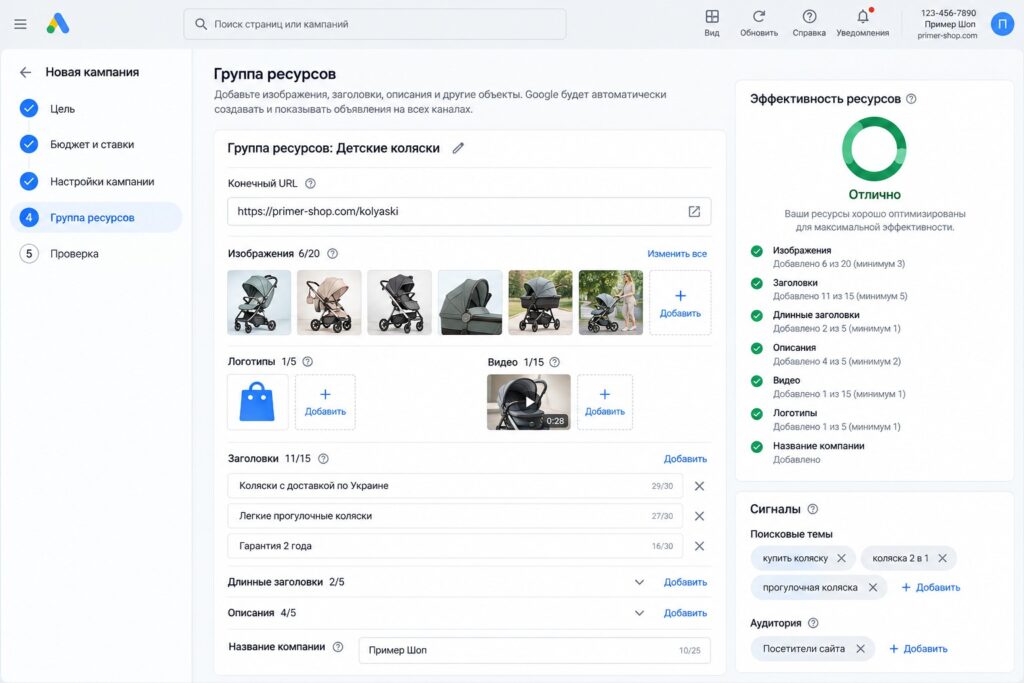
How to structure asset groups
Using one asset group for the whole campaign is a common mistake. If you sell both strollers and car seats with shared copy and images, the system will show generic, averaged ads. I split asset groups by meaning:
- by product category or service line;
- by margin (high-margin products separately);
- by audience type, if different people need different messages.
Each group gets its own images, copy and landing page. It is the same logic as in Google Ads account structure: different intent deserves a different ad.
Controls available in 2026
Performance Max was called a “black box” for a long time, but in 2025-2026 Google added plenty of controls:
- Search terms report. Shows which searches led to impressions and conversions. The data is thinner than in Search campaigns, but you can spot junk.
- Campaign-level negative keywords. You can add negatives directly to a Performance Max campaign and also use shared lists and account-level negatives. They apply to Search and Shopping traffic, not to YouTube or Display.
- Brand exclusions. You can block your own brand or competitor brands so Performance Max does not cannibalize a separate brand campaign.
- Channel performance report. Shows impressions, clicks and conversions by Search, YouTube, Display and other channels. You cannot allocate budget by channel manually, but you can see the picture.
- Placement exclusions for Display and YouTube.
- Excluding mobile apps, where cheap low-quality traffic often goes.
- Asset experiments to compare two sets of creatives.
Feature availability depends on the account and keeps expanding, so some items may be labeled slightly differently for you.
How to evaluate results
- Do not draw conclusions in the first 2 weeks. The campaign is learning, and cost per conversion can jump around.
- Do not change settings every day. Every major change to budget, strategy or goals restarts learning. I try not to change the budget by more than 15-20% at a time.
- Look at business results, not just the numbers in Google Ads. Compare them with real sales and leads in your CRM.
- Check the channel and search terms reports every 1-2 weeks: where the money goes and whether there is junk.
- Review assets. Google shows the performance of individual headlines and images inside the asset group. Replace weak ones with new ones.
Common Performance Max mistakes
- Optimizing for the wrong conversions. The most expensive mistake. The campaign faithfully delivers “conversions” that have nothing to do with sales.
- Brand traffic inside Performance Max. The campaign happily serves on searches for your brand, where conversions are cheap and would have happened anyway. The report looks great, but real growth is small. The fix: brand exclusions and a separate brand campaign.
- One asset group for everything. Ads end up vague.
- No custom video. Auto-generated videos usually look weak and perform poorly on YouTube.
- Budget too small for a high cost per conversion. The algorithm cannot collect data and never leaves learning.
- URL expansion on without control. Traffic lands on the blog, careers page or contact page.
- Constant tweaks. The campaign never gets time to learn.
FAQ
Does Performance Max replace Search campaigns?
No. A Search campaign gives you precise control over queries and copy, while Performance Max extends reach to other channels. In many accounts they work together: Search for core queries and Performance Max for reach and products.
What budget does Performance Max need?
It depends on your niche and cost per conversion. My rule of thumb: the daily budget should allow at least a few conversions per week. If your cost per lead is high and the budget is small, start with Search. I covered general budget benchmarks in my article on how much Google Ads costs.
Can I run Performance Max without a product feed?
Yes. For service and lead generation sites the campaign runs on assets: copy, images and video. But without a feed and with weak creatives, results are often worse than a well-built Search campaign.
How do I remove junk searches in Performance Max?
Check the search terms report and add negatives to the campaign, to a shared list or at the account level. For brand searches, use brand exclusions.
How long does Performance Max take to learn?
Usually 2 to 6 weeks, depending on conversion volume. The more conversions, the faster the algorithm stabilizes.
Conclusion
Performance Max is a powerful tool, not a magic button. It works great for online stores and for accounts with solid conversion data, good creatives and enough budget. Without those, the campaign will optimize for anything but your profit. Set up conversions, split asset groups by meaning, exclude your brand and junk, and give the campaign time to learn.
If you are not sure whether Performance Max is right for you, request a free Google Ads express audit: I will review your account and suggest where to start. I also publish setup walkthroughs on my YouTube channel.