
A Google Ads budget should come from your goal, not from an amount you “don’t mind spending”. Take the number of leads you need, divide by your site’s conversion rate to get the clicks required, multiply by the cost per click, and you have a monthly budget. Divide that by 30.4 and you get the average daily budget for the campaign. Below I walk through this calculation step by step, show where to get the numbers, and explain how to check that the result is realistic.
What you need before you start
You need four numbers. If some of them are unknown for now, that’s fine: start with an estimate and replace it with real data after a month.
- Goal. How many leads or sales you need per month.
- Site conversion rate. The share of visitors who leave a request.
- Cost per click. What a visit from your ads costs on average.
- Acceptable cost per lead. How much you can pay for a lead and stay profitable.
If you haven’t worked out the last number yet, start there. Without it, a budget means nothing on its own: you can spend a lot and still lose money.
How to calculate your budget: a step-by-step formula
I calculate the budget backwards, starting from the goal. Here is the order.
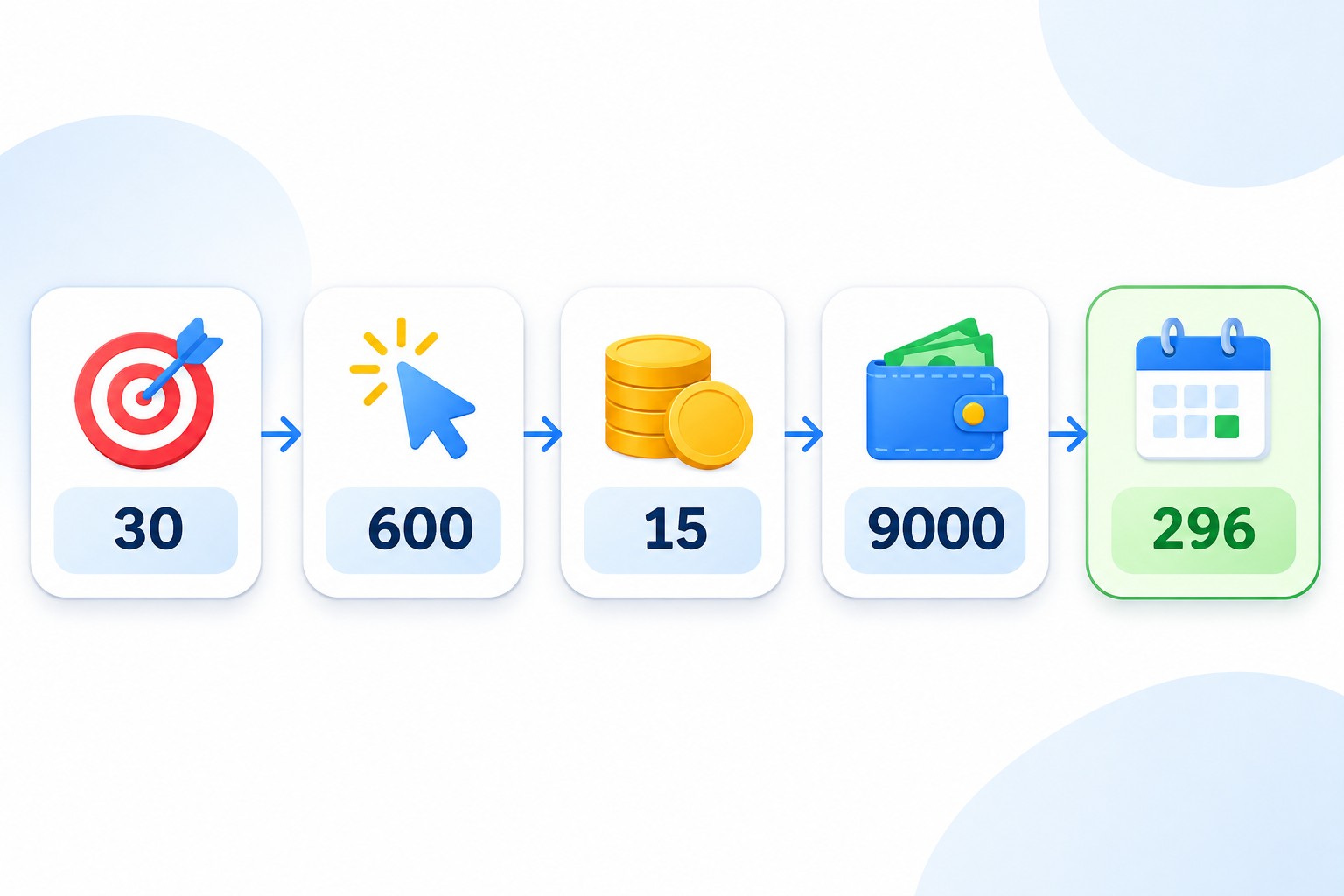
- Write down your goal in leads per month. For example, 30 leads.
- Divide the goal by your site’s conversion rate. At 5%, you need 30 / 0.05 = 600 clicks.
- Multiply the clicks by your average cost per click. If a click costs 15, the budget is 600 × 15 = 9,000 per month.
- Divide the monthly budget by 30.4 to get the daily figure. 9,000 / 30.4 is about 296 per day.
- Check the result against your economics. A budget of 9,000 for 30 leads means a cost per lead of 300. If you can afford that, the plan works. If not, change the inputs.
All these numbers are illustrative. In reality they depend on your niche, region and competition.
How conversion rate changes the budget
This example shows why cost per click alone isn’t enough. The goal stays at 30 leads, and a click still costs 15.
- At a 2.5% conversion rate, you need 1,200 clicks and a budget of 18,000.
- At 5%, you need 600 clicks and a budget of 9,000.
- At 10%, you need 300 clicks and a budget of 4,500.
The cost per click didn’t change, yet the budget differs fourfold. That is why, before asking for more ad money, I look at the website and the offer first. Sometimes improving a page does more than adding budget.
The same goes for cost per click. If you bring a click down from 15 to 10, the budget for the same 30 leads at 5% falls from 9,000 to 6,000. The numbers are illustrative, but the logic holds in any niche.
How to calculate a budget for an online store
For a store, it is easier to work from revenue and return on ad spend rather than leads. Here is the order.
- Set your target monthly revenue from advertising.
- Work out what share of revenue you can give to advertising, taking margin into account.
- Multiply revenue by that share to get the monthly budget.
- Divide the budget by 30.4 and split it across campaigns.
If a store wants 100,000 in revenue and can give 15% to advertising, the budget is 15,000. To check it is realistic, work backwards: divide the budget by the cost per click, then multiply the clicks by the conversion rate and average order value.
Where to get your cost per click and conversion rate
Cost per click
If your account is already running, use the average CPC for the relevant campaign over the last 30 days. If you are starting from scratch, use a forecast.
- Open Keyword Planner in the Google Ads tools section.
- Choose the option to get search volume and forecasts.
- Add your keywords and set the right location and language.
- Open the forecast tab and look at expected clicks, cost and average CPC.
Forecasts are useful, with some caveats. They cover the Search Network only and average a week of data into a daily figure. For a new account, the forecast relies on averages across all advertisers, so your real CPC may differ. Accuracy drops for small regions. I always include a buffer and never plan the budget too tightly.
Site conversion rate
If you have run ads before, take the rate from Google Ads or GA4. If not, start with a modest number and test it in practice. Conversion rates depend heavily on the offer, the price and the page, so other people’s averages don’t tell you much.
How the daily budget works in Google Ads
In a campaign you set an average daily budget, not a monthly amount. Here is what to know so your spend doesn’t surprise you.
- On some days, spend can exceed the amount you set. For most campaigns, the daily ceiling is twice your average daily budget.
- Over a month, the system won’t spend more than the average daily budget × 30.4. That is your monthly limit.
- On days with lower demand, spend will be lower.

There is another option: a campaign total budget. You enter a total amount and dates, and the system distributes the spend. It suits promotions and campaigns with a clear end date, and it is available for Search, Performance Max, Shopping, Demand Gen and YouTube. The minimum length is 3 days, and most types can run up to 90 days. This budget type is only available when you create a new campaign, and it can’t be changed later.
How much budget you need to start
The minimum budget is set by the amount of data you need, not by Google’s rules. A campaign needs enough clicks for you to see what works. I suggest this rule of thumb: the budget should buy at least 30 conversions a month, because that is the volume at which Google recommends evaluating results, and automated strategies are more stable there.
If the number you get is too high, narrow the task rather than spreading the money thin.
- Keep one most profitable service or product group.
- Narrow the region to the places where you earn more.
- Remove broad and expensive searches, and keep those with clear buying intent.
- Show ads during working hours if that is when leads get handled.
One campaign with enough budget beats five campaigns that are all short of money. I covered how to split campaigns in my article on Google Ads account structure.
How to distribute budget across campaigns
When there are several campaigns, I distribute money by a simple rule.
- Campaigns with the best economics get budget first. Usually these are searches with buying intent.
- The brand campaign gets what it needs to cover demand for your name.
- The rest goes to tests: new services, new campaign types, new regions.
Once a week I check which campaign is limited by budget and which isn’t spending what it has. If a campaign is profitable and limited by budget, that is where to add money. If its cost per click is too high, deal with that first, or you will just lose money for longer.
If you are setting up ads for the first time, start with my step-by-step search campaign guide.
How to adjust the budget after launch
The first calculation is always a hypothesis. After 2-4 weeks you will have real numbers, and the calculation should be redone.
- Replace the forecast CPC and conversion rate with actual ones.
- Compare your cost per lead with the plan.
- If leads are cheaper than planned and the campaign is limited by budget, increase it gradually. After each change, watch how the cost moves.
- If leads are more expensive than planned, don’t add money. Check search terms, ads and the website first.
To account for seasonality, look at last year’s data. In peak season, demand and cost per click can rise noticeably, so plan those months separately.
Common mistakes
- Starting from an amount instead of a goal. You spend money without knowing how many leads you should get.
- Using average CPCs from other people’s reports. In your niche and region, the number can be completely different.
- Dividing the monthly budget by 30. The system counts a month as 30.4 days, so use that number.
- Running many campaigns on a small budget. As a result, none of them gathers enough data.
- Panicking over one day’s spend. Going over the daily figure doesn’t mean the monthly limit will be exceeded.
- Changing the budget every day. Automated strategies need stability to learn.
- Judging results after a week. It is easy to get it wrong on a small amount of data.
Frequently asked questions
What is the minimum budget for Google Ads?
There is no formal minimum that matters for results. What matters is having enough for a sufficient number of clicks: work out what 30 conversions a month would cost and start from there. In competitive niches, that amount will be noticeably higher.
Why did Google spend more than my daily budget?
Because the amount you set is an average. On high-demand days, spend can be up to twice as much for most campaigns, but over a month it won’t exceed the average daily budget × 30.4.
How do I calculate a budget with no data?
Take the CPC from Keyword Planner, assume a modest conversion rate and add a buffer. After a month of advertising, replace the estimates with real data.
Should I increase my budget when Google suggests it?
Not automatically. The recommendation shows that the campaign could get more traffic. Check your cost per lead first. If it is on target and the campaign is profitable, add money gradually.
Conclusion
A sound budget comes from your goal and economics: leads, conversion rate, cost per click, then a check against your acceptable cost per lead. The first calculation gives you a reference point, and the real numbers arrive after a few weeks of advertising.
If you would like me to look at your numbers, order a free Google Ads express audit. If you need ads launched from scratch, see the Google Ads setup page. I also publish breakdowns of advertising and analytics on my YouTube channel.