
Quality Score in Google Ads is a rating from 1 to 10 for a keyword. It shows how useful your ad and landing page are compared with other advertisers on the same keyword. Do not try to raise it for the number itself. Find which of the three components is rated “Below average” and fix that one. Usually that means tighter ad groups, better ads and a better page.
In more than 9 years of working with Google Ads, I have seen plenty of accounts where Quality Score became the main goal: weeks spent chasing 8s and 9s while sales stayed flat. I have also seen the opposite, low scores left alone for years while clicks cost more than they should and nobody noticed. Here is how to treat this number in a practical way.
What Quality Score is
Quality Score is a diagnostic tool for Search campaigns. Each keyword gets its own score on a scale of 1 to 10. It compares your advertising with other advertisers who showed on the same keyword.
Two points often get mixed up:
- Quality Score is not used directly in the auction. Google says plainly that it is a diagnostic tool, not a key performance indicator.
- What it measures does matter for the auction, though. At every auction the system calculates Ad Rank and assesses similar factors in real time: expected CTR, ad relevance and landing page experience.
So I treat it like a warning light on a dashboard. The light fixes nothing, but it tells you where to look. If you feel your clicks cost too much, Quality Score is often the first clue as to why.
What makes up the score
There are three components:
- Expected CTR. How likely people are to click your ad for this keyword.
- Ad relevance. How closely your ad text matches the meaning of the search.
- Landing page experience. How useful the page is and how well it matches what people expect after they click.
Each component is rated “Above average”, “Average” or “Below average”. The comparison is against ads that showed on the same keyword over the last 90 days.
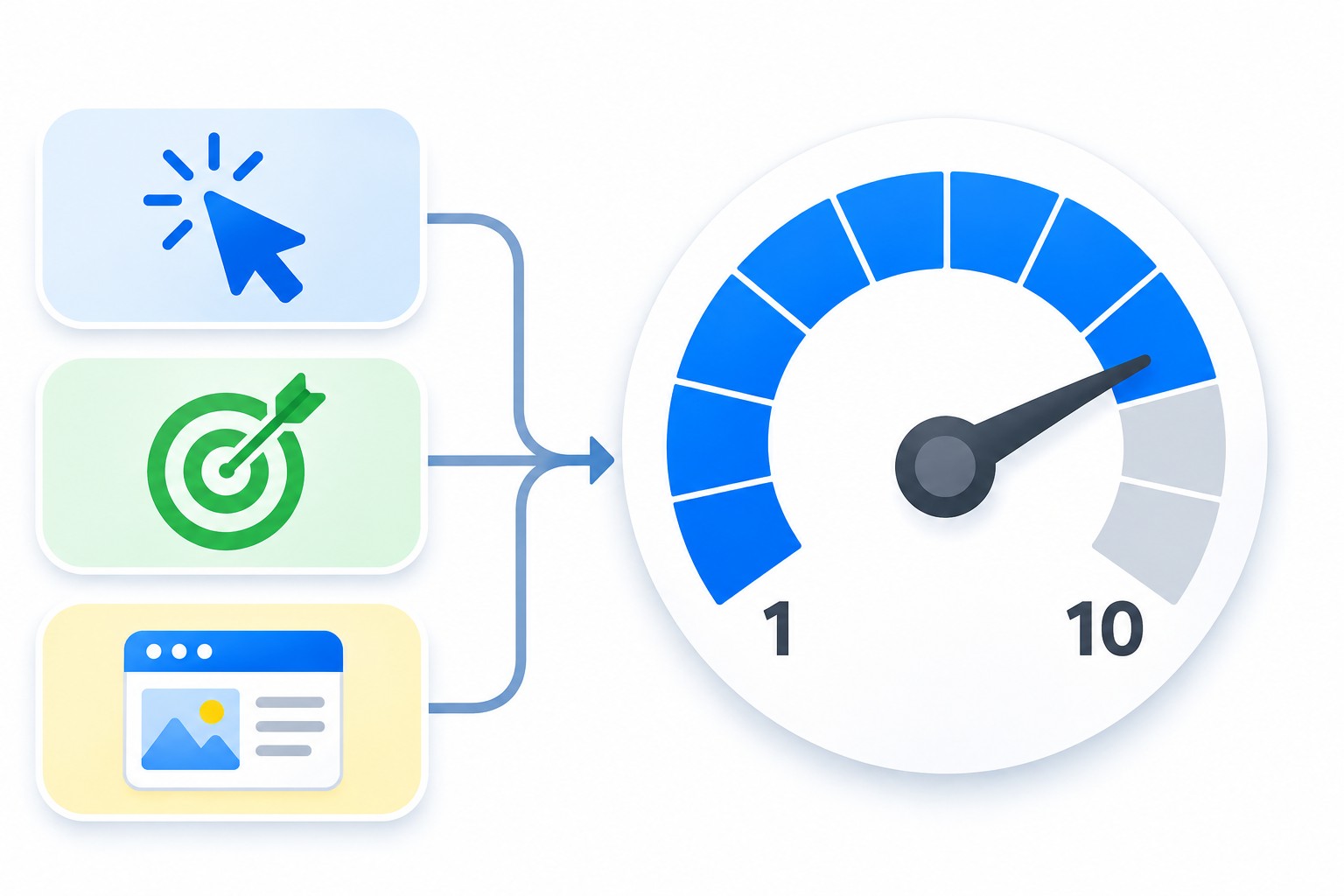
The diagram shows the idea: the three components feed into a single score from 1 to 10.
A few more things about the calculation:
- the score does not take device, location or time of day into account;
- it is based on impressions for searches that exactly match the keyword, so changing the match type does not change the score by itself;
- it updates gradually, so check changes a few weeks after your edits, not the next day.
Where to find Quality Score
The score columns are not in the table by default, so you need to add them.
- Sign in to your Google Ads account.
- Open “Keywords”.
- Click the columns icon above the table on the right.
- Open the “Quality Score” section.
- Select the columns: “Quality Score”, “Exp. CTR”, “Ad relevance”, “Landing page exp.”
- Click “Apply”.
There are also columns marked “(hist.)”. They show values for the selected period rather than the current status, so they are handy for before and after comparisons. Segmenting by day helps you see when the score changed.
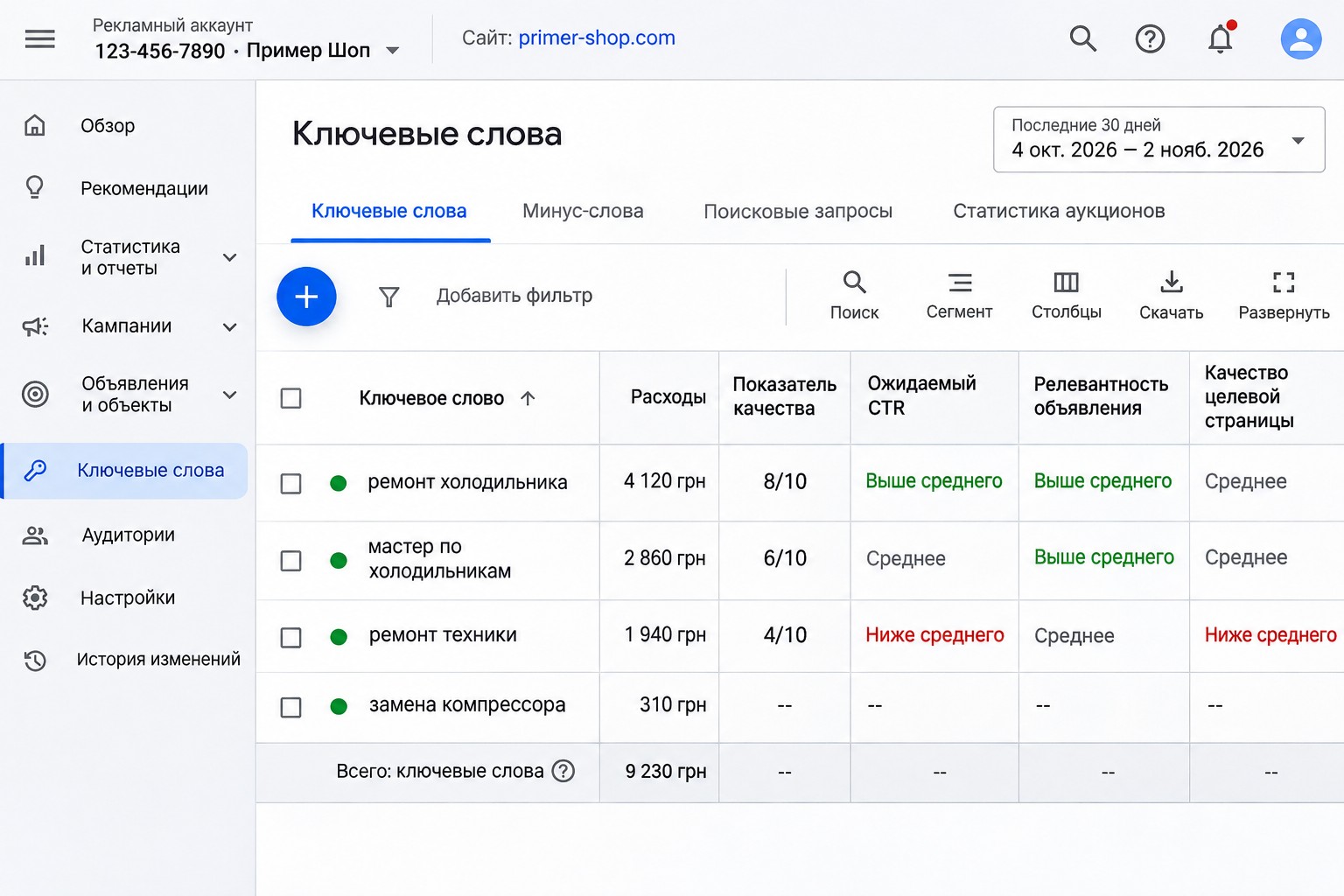
The screenshot above shows the Russian interface, and your columns will have the same layout in English.
If you see a dash “–” instead of a number, there are not enough searches on this keyword to calculate a score yet. It is not an error. You can leave the keyword as it is, or, if volume is really too low, look for higher-volume options in Keyword Planner.
What counts as a good score
There is no single right number, as it depends on the type of search and your niche. These are my general guidelines:
- 7-10: fine, look for growth elsewhere;
- 5-6: workable, see which component pulls it down;
- 1-4: worth a closer look, especially if the keyword takes real budget.
There are exceptions. Searches for your own brand usually score high. Competitor names almost always score low, and that is normal: an ad about you is a poor match for a search about someone else. Broad generic keywords can also sit at average, because people mean different things by them.
Start with the keywords that get the most budget. A 2 on a keyword with three clicks a month does not matter. A 5 on a keyword taking a quarter of your budget does.
How to improve Quality Score, step by step
Find the weak component first rather than editing everything.
- Sort keywords by cost for the last 30 days.
- Take the top 20-30 keywords.
- Add the component columns.
- For each keyword, find “Below average” or “Average” ratings.
- Work through the sections below based on the component.
If ad relevance is below average
This is usually a structure problem. One ad group holds keywords with different meanings, and a general ad does not fit any of them closely.
What to do:
- split a large ad group into several groups of closely related keywords;
- write ads for the topic of each group;
- use the keyword or a close variation in a headline;
- check that your ads match real searches, not just your keywords.
I cover how to divide campaigns in my article on account structure. Real searches are in the search terms report: if it is full of junk, relevance will not improve until you filter it out.
If expected CTR is below average
Your ad gets fewer clicks than expected for this search.
What to do:
- be specific in your headlines: price, timing, terms, warranty;
- write headlines that say different things instead of repeating one idea;
- remove vague phrases like “Best quality”;
- add assets, since sitelinks and callouts make your ad larger and easier to notice;
- check that your offer matches what people want. If they search for “repair” and you talk about “sales”, they will not click.
There is a step-by-step walkthrough in my guide on how to write a responsive search ad.
If landing page experience is below average
This is the least pleasant case, because it usually means changing the site rather than the ad.
What to check:
- the ad leads to the page for this service, not the home page;
- the first screen shows what the ad promised;
- the page loads quickly on a phone;
- the next step is clear: a button, a form, a phone number;
- prices, terms, contact details and company information are there;
- no pop-ups cover the content.
Google recommends using the same message in the ad and on the page. If your ad says “Next-day delivery”, people should see that right after they click.
How Quality Score affects cost per click
There is no direct formula: you pay based on the auction, not on Quality Score. But advertising that better matches a search generally gets a higher Ad Rank at the same bid. So you can show just as high while paying less, or higher for the same money. The actual saving depends on your niche and competition, so I will not promise a percentage.
The logic is the same with automated bidding: the system sets the bid, but a weak ad and page give it fewer chances to win good auctions.
What Quality Score will not tell you
The number says nothing about leads or sales. A keyword with a 9 may bring curious readers rather than customers. A keyword with a 5 may bring steady sales at an acceptable cost. That is why I always look at conversions, cost per lead and revenue next to it. If conversions are not set up, start there, because without them any optimization is guesswork.
Common mistakes
- Chasing a 10. Google does not pay you for the number, customers do. If a keyword with a 5 brings leads at the right cost, leave it alone.
- Deleting low-score keywords without checking. Look at conversions first.
- Judging by a single day. The score changes gradually, so base decisions on weeks of data.
- Changing the match type for the score. It has no effect on the calculation.
- Looking only at the account average. Look at specific keywords with high spend.
- Editing ads when the page is the problem. If landing page experience is below average, new headlines will not help.
- Optimizing only for CTR. A flashy ad can bring clicks but no leads.
If you are not sure where the problem is, a full review helps. That is what I do in a Google Ads audit.
FAQ
Does Quality Score affect the auction?
Not directly, as it is not used at auction time. But the auction weighs similar factors in real time, so a good score usually goes along with a stronger ad position.
What does a dash instead of a score mean?
There are not enough searches on the keyword to calculate a score yet. That is normal for rare keywords and new campaigns.
How quickly does Quality Score change after edits?
It usually takes time, often a few weeks, because the comparison uses 90 days of data. There is no exact timeframe, and it depends on your impression volume.
Does Performance Max have Quality Score?
No. Quality Score applies to keywords in Search campaigns. In other campaign types, look at conversions and asset performance.
Should I pause keywords scoring below 3?
Only if they do not bring leads. Check conversions and cost per lead first. If a keyword works, try to improve it rather than turn it off.
Conclusion
Quality Score is a hint, not a goal. Focus on keywords with high spend, find the weak component and fix that one: structure, ad or page. Judge your campaign by leads and sales, not by a number in a table.
If you want me to look at what is holding your campaigns back, request a free express audit. I also publish practical Google Ads walkthroughs on my YouTube channel, so feel free to subscribe.